Krea 2 Turbo 4-Step Distillation LoRA
A community-trained LoRA that takes Krea 2 Turbo from 8 steps down to 4 — cutting generation time roughly in half while holding most of the quality. In my testing it kept image quality strong while bringing a generation down to under 20 seconds on 16 GB of VRAM. If you already run Krea 2 Turbo, this drops straight into your setup for a free speed boost.
✓ 100% free — download the workflow and run it locally.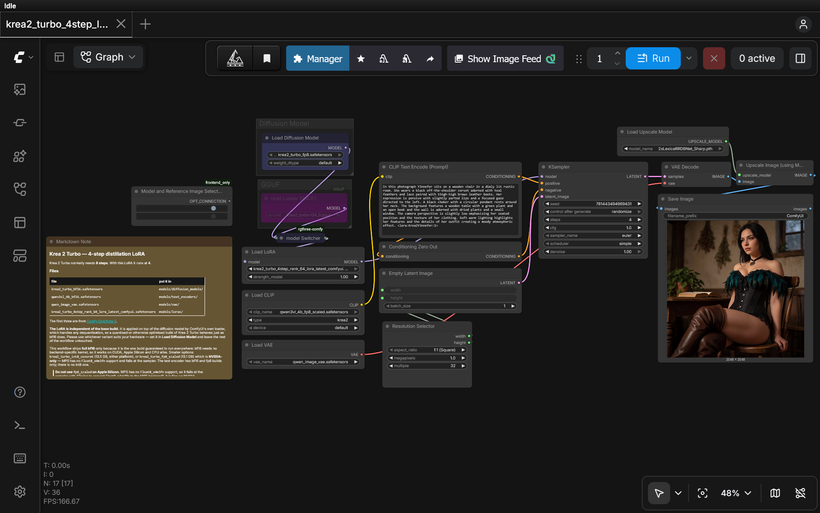
Requirements
- NVIDIA RTX 30XX / 40XX / 50XX GPU
- CUDA-compatible GPU — FP8 for 16 GB+, or a GGUF quant for smaller cards (runs on 8 GB with the right quant)
- At least 20 GB free storage
Model downloads
- lvladikov https://huggingface.co/lvladikov/Krea2-Turbo-Distill-4step-LoRA
- Krea 2 Turbo FP8 – the workflow default https://huggingface.co/AlperKTS/Krea2_FP8/tree/main
- Krea 2 Turbo GGUF – low VRAM option, pick your quant https://huggingface.co/vantagewithai/Krea-2-Turbo-GGUF/tree/main
- qwen3vl_4b_fp8_scaled.safetensors https://huggingface.co/Comfy-Org/Qwen3-VL/tree/main/text_encoders
- qwen_image_vae.safetensors https://huggingface.co/Comfy-Org/Qwen-Image_ComfyUI/tree/main/split_files/vae
- krea2_turbo_4step_rank_64_lora_latest_comfyui.safetensors – lvladikov/Krea2-Turbo-Distill-4step-LoRA https://huggingface.co/lvladikov/Krea2-Turbo-Distill-4step-LoRA/tree/main
Custom nodes
- ComfyUI Manager https://github.com/ltdrdata/ComfyUI-Manager
- ComfyUI-GGUF (for the GGUF loader path) https://github.com/city96/ComfyUI-GGUF
- rgthree-comfy https://github.com/rgthree/rgthree-comfy
Setup steps
- Download the free workflow .json with the button above.
- Download the 6 model file(s) listed above into their ComfyUI model folders.
- Install the 3 custom node(s) listed above via ComfyUI Manager, then fully restart ComfyUI.
- Drag the workflow .json onto the ComfyUI canvas and confirm each loader node has the right model selected.
- Run it. If a node shows red, update ComfyUI and restart before troubleshooting anything else.
Notes & tips
- What's in My Workflow: GGUF loader path alongside the default FP8, so you can run a quantized model on lower-VRAM cards (switch between them with the model Switcher).; Resolution Selector for quick aspect-ratio and size presets.; Upscale nodes for a clean high-res pass after generation.
- Load the workflow and pick your model path — FP8 (default) or GGUF — with the model Switcher. For GGUF, load your chosen quant in the Unet Loader GGUF node.
- Settings that matter: steps 4, cfg 1.0 (Turbo is CFG-free), sampler euler, scheduler simple, LoRA strength 1.0.
- The negative prompt is a ConditioningZeroOut — at cfg 1.0 it isn't evaluated, so there's nothing to write in it.
- To compare against stock Turbo, set steps back to 8 and bypass the LoRA node (Ctrl+B).
- If you use GGUF, make sure ComfyUI-GGUF is installed or the Unet Loader GGUF node won't appear.
- Since the LoRA is a work in progress, occasionally re-download the _latest file to pick up newer checkpoints.
More resources
- https://www.patreon.com/TheLocalLab/posts/krea-2-image-in-162660487
- https://www.patreon.com/TheLocalLab/posts/krea-2-all-in-6-163760558
- https://www.locallabdigest.com/product-page/krea-2-image-model-in-stable-forge-ui-neo-6-gb-vram-one-click-installer
- Krea 2 RunPod Template https://get.runpod.io/Krea2-ComfyUI
Want the 1-click version?
Skip the manual model downloads and node installs — get a ready-to-run installer, or unlock all 80+ with Local Lab Pro.