Z-Image-Turbo ControlNet - ComfyUI & One Click Windows Installer
$4.00
✓ In Stock⭐ Get all 84+ installers for $10/month
Local Lab Pro gives you instant access to all 84+ installers and workflows we've ever made — plus every new release the moment it drops. No buying individually. One membership, everything included.
View Local Lab Pro membership →Secure checkout via Wix — or get all 84+ with Pro
// About this product
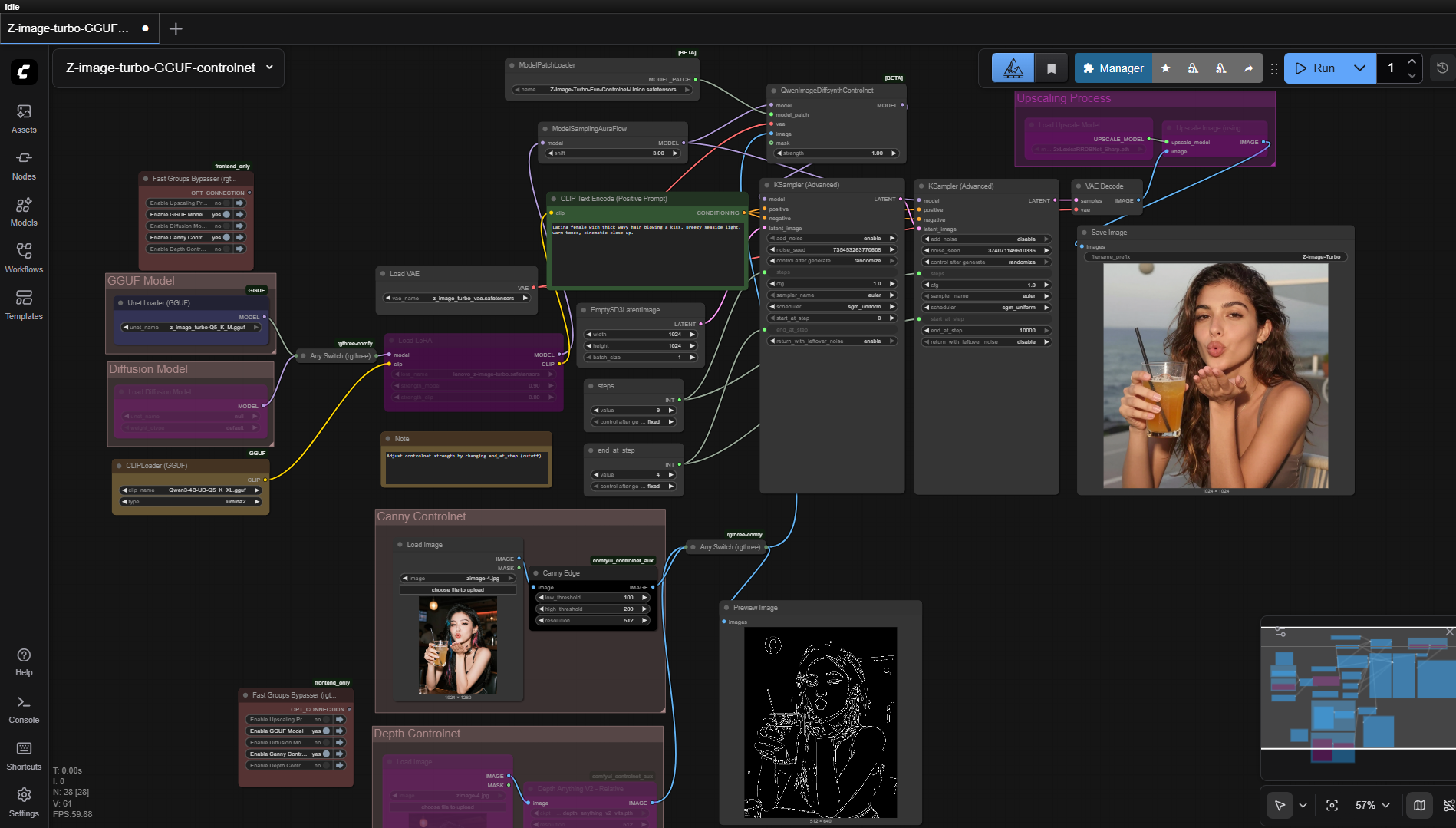
Alibaba has officially released the ControlNet model for Z-Image Turbo, marking a major leap forward in controlled image synthesis. This custom setup offers an all-in-one one-click installer that automatically installs and configures everything you need.
The workflow currently supports Canny and Depth ControlNet modes. Both can be toggled or combined as needed for flexible composition and edge-guided output. The included Union model provides improved coherence between prompt description and visual output while maintaining high speed and image fidelity.
Included in the Installer Package
It automatically sets up:
- ComfyUI and the necessary custom nodes
- Sage Attention 2
- Flash Attention 2
- Triton for Windows
- PyTorch: 2.8.0+cu128
Preloaded Models
- z_image_turbo-Q5_K_M.gguf — Hugging Face
- Z-Image-Turbo-Fun-Controlnet-Union-2.1.safetensors — Hugging Face
- Qwen3-4B-UD-Q5_K_XL.gguf text encoder — Hugging Face
- z_image_turbo_vae.safetensors VAE model — Hugging Face
- 2xLexicaRRDBNet_Sharp.pth upscale model — Hugging Face
Performance and Speed
Generates 1024x1024 images in under 1 minute 30 seconds (9 steps) on an RTX 4050 (6 GB VRAM) using the Q5_K_M GGUF model. Performance scales automatically — expect faster generation and higher resolution on GPUs such as the RTX 4090.
System Requirements
- GPU: Nvidia RTX 30XX, 40XX, or 50XX series (FP16 support required)
- VRAM: 4 GB minimum (8+ recommended)
- OS: Windows
- Storage: 20 GB free space
Usage Notes
- The workflow supports both Z-Image-Turbo GGUF models and standard Z-Image-Turbo diffusion models.
- Use the Fast Groups Bypasser node to enable or disable workflow sections.
- Disable unused ControlNet modules (Canny or Depth) before generation to optimize performance.
- For best results, craft descriptive text prompts and refine them with assistance from an LLM.