Qwen3-TTS Voice Cloning - ComfyUI & One Click Windows Installer
$4.00
✓ In Stock⭐ Get all 84+ installers for $10/month
Local Lab Pro gives you instant access to all 84+ installers and workflows we've ever made — plus every new release the moment it drops. No buying individually. One membership, everything included.
View Local Lab Pro membership →Secure checkout via Wix — or get all 84+ with Pro
// About this product
The latest Qwen3-TTS Text-to-Speech AI Voice Cloning ComfyUI Workflow is now here — and it's easier than ever to get running. Featuring full Flash Attention support and an optimized one-click installer, you can start experimenting in minutes instead of hours.
Qwen3-TTS is the newest generation of text-to-speech models from Qwen AI, delivering near human-level realism in synthesized voices. Available in lightweight and large model sizes (0.6B and 1.7B), these models balance performance and quality — ideal for everything from interactive storytelling to AI voice assistants.
Key Highlights
- Natural prosody and emotion control for dynamic speech output
- Fast inference powered by FlashAttention 2.8.3 + CUDA 12.8
- Flexible voice cloning with just a few seconds of audio reference
- High-fidelity 12Hz generation with expressive tone shaping
Included in the Package
The automated installer sets up everything required to run Qwen3-TTS models through ComfyUI, including:
- Flash Attention: flash_attn-2.8.3+cu128torch2.8
- PyTorch: 2.8.0+cu128
- ComfyUI Windows Portable
System Requirements
- Windows OS
- NVIDIA GPU with CUDA support (RTX 30XX or later recommended)
- Minimum VRAM: 4 GB (more for faster processing)
- Free Disk Space: At least 30 GB
- FFmpeg and SOX (Sound eXchange) required
Usage Notes
- Place the installer files in a dedicated folder, then double-click to begin setup — no extra configuration required.
- Load the provided workflow inside ComfyUI.
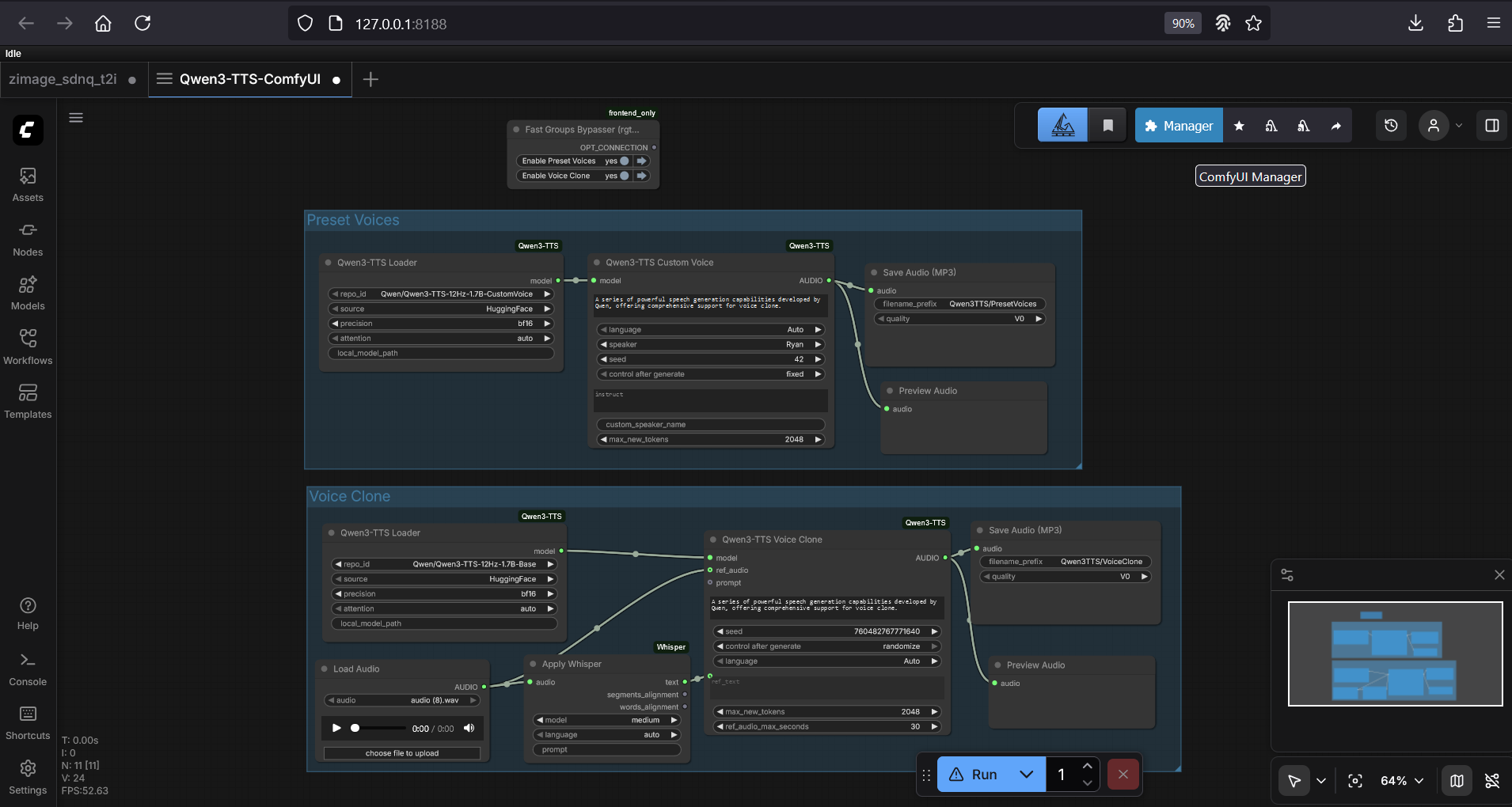
- Toggle between Preset Voices and Voice Cloning sections using the Fast Groups Bypasser above each section. Only one should be active at a time.
- Preset Voices: Choose the Qwen3-TTS model (1.7B or 0.6B), enter your text, add style or tone instructions (e.g., calm and friendly, energetic podcast style), then click Generate.
- Voice Cloning: Select your model, upload a 3-10 second reference clip (shorter clips are best), then click Generate.