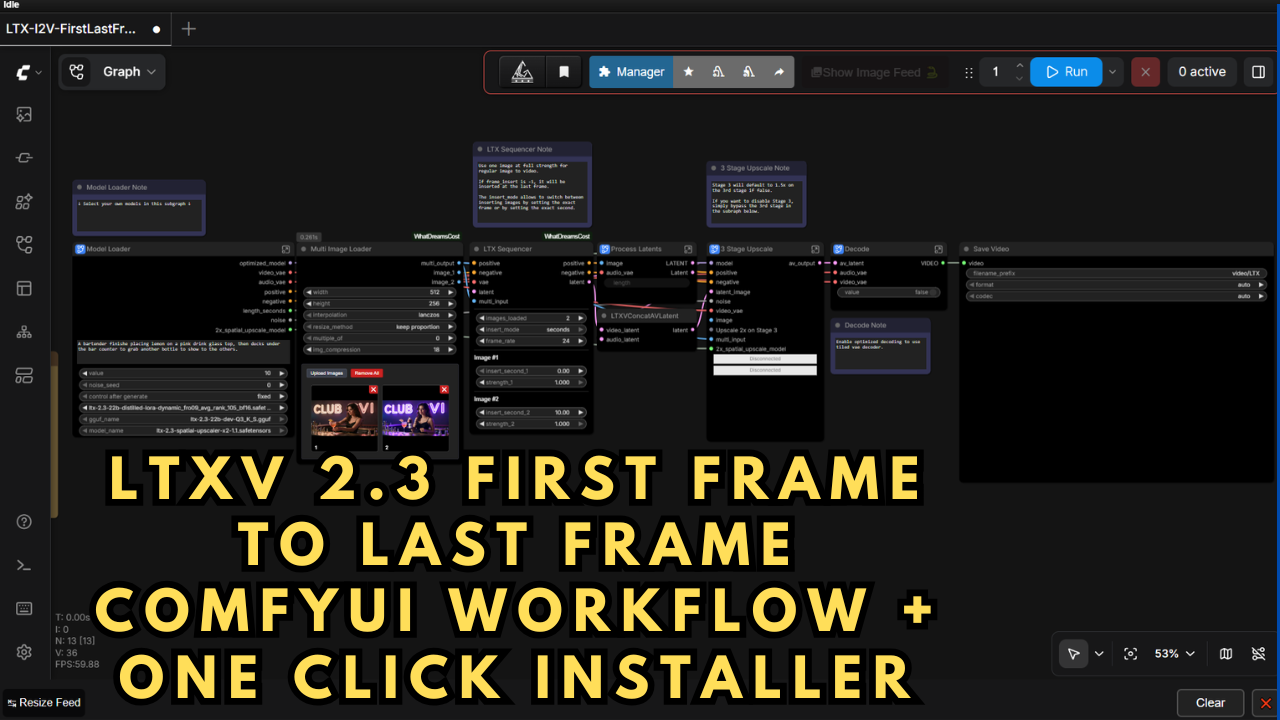
LTXV 2.3 First Frame to Last Frame ComfyUI Workflow + One Click Installer
$4.00
✓ In Stock⭐ Get all 84+ installers for $10/month
Local Lab Pro gives you instant access to all 84+ installers and workflows we've ever made — plus every new release the moment it drops. No buying individually. One membership, everything included.
View Local Lab Pro membership →Secure checkout via Wix — or get all 84+ with Pro
// About this product
The LTX 2.3 First Frame and Last Frame workflow introduces a more story-driven image-to-video generation process by allowing full control of both the starting and ending frames. This enhancement transforms standard AI-generated clips into visually consistent sequences with smoother scene progression and more cinematic transitions.
I came across the original workflow on the Whatdreamcosts GitHub repository and have made a few performance-focused tweaks to improve compatibility with GGUF UNet and CLIP models. These adjustments make the workflow significantly faster and better suited for low VRAM devices.
In testing on a 24GB RAM GPU, I achieved a 1280×640 10-second video in about 3–4 minutes using all three processing phases. You can explore the original workflow and a full video tutorial by the creator here:
Whatdreamcosts GitHub Repo & Tutorial:
https://www.youtube.com/watch?v=aXDIr8eNovI
One Click Installer (Low VRAM GGUF Version)
To make setup effortless, I’ve built a One Click Installer for the lower VRAM GGUF version of the LTX 2.3 workflow. It includes all the essential model files, preloaded in the correct ComfyUI directory structure so you can start generating immediately.
Preloaded Models Within the Installer (Low VRAM):
-
ltx-2.3_text_projection_bf16.safetensors – Hugging Face Link
-
gemma-3-12b-it-UD-Q5_K_XL.gguf – Hugging Face Link
-
LTX23_audio_vae_bf16.safetensors – Hugging Face Link
-
LTX23_video_vae_bf16.safetensors – Hugging Face Link
-
ltx-2.3-22b-dev-Q3_K_S.gguf – Hugging Face Link
-
ltx-2.3-spatial-upscaler-x2-1.0.safetensors (Upscale Model) – Hugging Face Link
-
ltx-2.3-22b-distilled-lora-dynamic_fro09_avg_rank_105_bf16.safetensors (LoRA) – Hugging Face Link
The standard LTX 2.3 22B checkpoint models (BF16, FP8) aren’t bundled within the installer, but can be easily downloaded from Kijai’s official Hugging Face repository:
LTX-2 19B Diffusion Models
Speed & Performance
You can generate 10-second 1280×640 video in about 3–4 minutes on 24 GB VRAM.
The workflow intelligently adapts to your hardware—running efficiently on lower VRAM GPUs while still achieving smooth motion and crisp visual detail. The process begins at lower resolution and automatically upscales 2× in the final two sampling phases to deliver stunning, high-resolution renders.
System Requirements
-
NVIDIA RTX 30XX / 40XX / 50XX GPU (FP16 supported)
-
CUDA-compatible GPU (minimum 20GB VRAM, 24GB+ recommended)
-
Windows OS
-
Minimum 50GB free storage
What’s Included
-
Portable ComfyUI Windows Installer (pre-configured for LTX 2.3 image-to-video)
-
Automated model downloads and ComfyUI nodes setup
-
Optimized long-sequence video workflows for flexible use
-
Designed for both beginners and advanced AI video creators
Usage Notes
-
Fully compatible with LTX 2.3 22B GGUF (optimized for Low VRAM setups).
-
Use rich, detailed text prompts for better motion coherence and narrative control.
-
For the First Frame / Last Frame workflow, start with high-resolution reference images to ensure clarity and consistent detail throughout your video.
-
Add both images in the Multi Image Loader, arranging image 1 as the start and image 2 as the final frame.
-
Adjust resolution based on your GPU’s capacity—higher resolutions demand more VRAM.
-
To customize or expand the workflow, open the subgraph’s prompt node and use the top-right arrow for advanced settings.