Qwen-Image 2.1 Turbo Edit (4–6 Step)
Qwen-Image 2.1 edits look great, but 20+ steps per edit adds up. This drop wires community turbo LoRAs into the image-edit workflow so edits finish in 4-6 steps at cfg 1 — a big speedup with no extra model swaps. Two different turbo LoRAs are covered here, from two teams, so you can pick the one that fits your card and step count.
✓ 100% free — download the workflow and run it locally.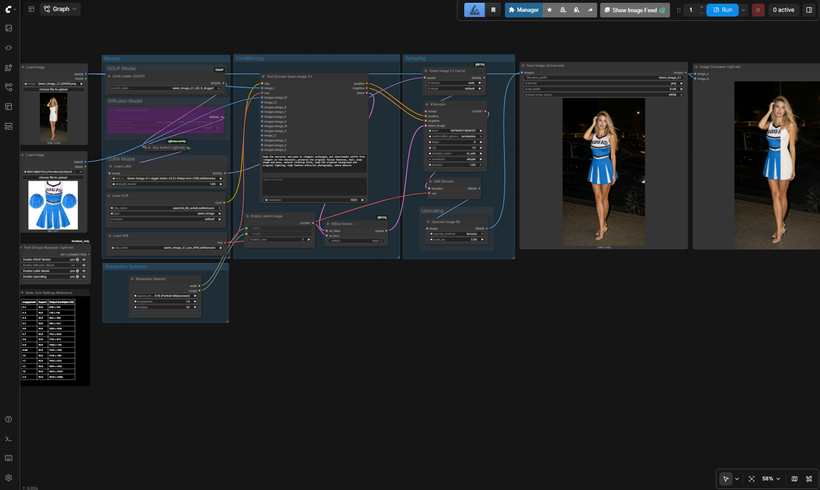
Requirements
- NVIDIA RTX 30XX / 40XX / 50XX GPU
- CUDA-compatible GPU — ~16 GB for int8, or 6-8 GB with a GGUF quant + the w4a8 encoder
- At least 20 GB free storage
Model downloads
- Viggle 6-step — Qwen-Image-2.1-viggle-turbo-v0.2.1-6step-lora-r256.safetensors — loaded by default in this workflow, run at ~6 steps. By Viggle https://huggingface.co/Viggle/Qwen-Image-2.1-viggle-turbo/tree/main
- Alibaba-PAI 4-step — Qwen-Image-2.1-Fun-Acc-4Step.safetensors — the faster alternate, run at 4 steps. By Alibaba-PAI https://huggingface.co/alibaba-pai/Qwen-Image-2.1-Fun-Acc-LoRAs/tree/main/models
- qwen_image_2.1_int8_convrot.safetensors – ~7 GB, the default https://huggingface.co/Comfy-Org/Qwen-Image-2.1/tree/main/diffusion_models
- qwen_image_2.1_Q5_K_M.gguf – low VRAM, ~4-7 GB by quant https://huggingface.co/Abiray/Qwen-Image-2.1-GGUF/tree/main
- qwen3vl_8b_int8_convrot.safetensors – alternate encoder https://huggingface.co/Comfy-Org/Qwen-Image-2.1/tree/main/text_encoders
- qwen_image_2.1_vae_bf16.safetensors – required https://huggingface.co/Comfy-Org/Qwen-Image-2.1/tree/main/vae
- Qwen/Qwen-Image-2.1 https://huggingface.co/Qwen/Qwen-Image-2.1
- Alibaba-PAI https://huggingface.co/alibaba-pai/Qwen-Image-2.1-Fun-Acc-LoRAs/tree/main
Custom nodes
- ComfyUI Manager https://github.com/ltdrdata/ComfyUI-Manager
- ComfyUI-GGUF (for the GGUF loader path) https://github.com/city96/ComfyUI-GGUF
- rgthree-comfy (Image Comparer, bypasser) https://github.com/rgthree/rgthree-comfy
Setup steps
- Download the free workflow .json with the button above.
- Download the 8 model file(s) listed above into their ComfyUI model folders.
- Install the 3 custom node(s) listed above via ComfyUI Manager, then fully restart ComfyUI.
- Drag the workflow .json onto the ComfyUI canvas and confirm each loader node has the right model selected.
- Run it. If a node shows red, update ComfyUI and restart before troubleshooting anything else.
Notes & tips
- ⚠️ Read This First - Turbo Caution: Image editing: the turbo LoRAs are consistently great here. This is what the workflow is built for, and it's reliable.; Text-to-image: it's hit-or-miss. Some prompts come out clean, others come out incomplete or smeared. I saw the same behavior on both LoRAs, so it isn't one bad file — the cause is unknown, and hopefully the creators tighten it up in a future version.
- The Two Turbo LoRAs: Viggle 6-step — Qwen-Image-2.1-viggle-turbo-v0.2.1-6step-lora-r256.safetensors — loaded by default in this workflow, run at ~6 steps. By Viggle — Hugging Face Repo; Alibaba-PAI 4-step — Qwen-Image-2.1-Fun-Acc-4Step.safetensors — the faster alternate, run at 4 steps. By Alibaba-PAI — Hugging Face Repo
- Recommended Settings: Steps: 6 for the Viggle LoRA, 4 for the Alibaba-PAI LoRA; CFG: 1; Sampler: er_sde (euler also works); Scheduler: simple; LoRA strength: 1.0
- Load your source image through the Load Image node, and pick your model path (FP8/int8 or GGUF) with the Fast Groups Bypasser.
- Describe the edit in plain language — Qwen-Image 2.1 is instruction-driven, so "make the sky sunset orange" works better than keyword soup.
- For multi-image edits, you can supply up to 10 reference images; the output follows the first image's canvas.
- Keep custom resolution close to the resized source, or the edit can shift.
- Turbo is for edits — for reliable text-to-image, switch back to the full-step non-turbo model (see the caution above).
More resources
- Qwen-Image 2.1 All-in-One One-Click Installer (Patreon) https://www.patreon.com/TheLocalLab/posts/qwen-image-2-1-170300735
Want the 1-click version?
Skip the manual model downloads and node installs — get a ready-to-run installer, or unlock all 80+ with Local Lab Pro.