Qwen-Image 2.1 Text-to-Image
Qwen-Image 2.1 is Qwen's newly released image model, and it's a big one — a unified text-to-image generation and image editing model with just 7B parameters in its visual generation component, making it smaller and more efficient than the previous open Qwen image release while still producing excellent quality. It even generates native transparent (RGBA) images directly from a prompt, which is rare for an open model.
✓ 100% free — download the workflow and run it locally.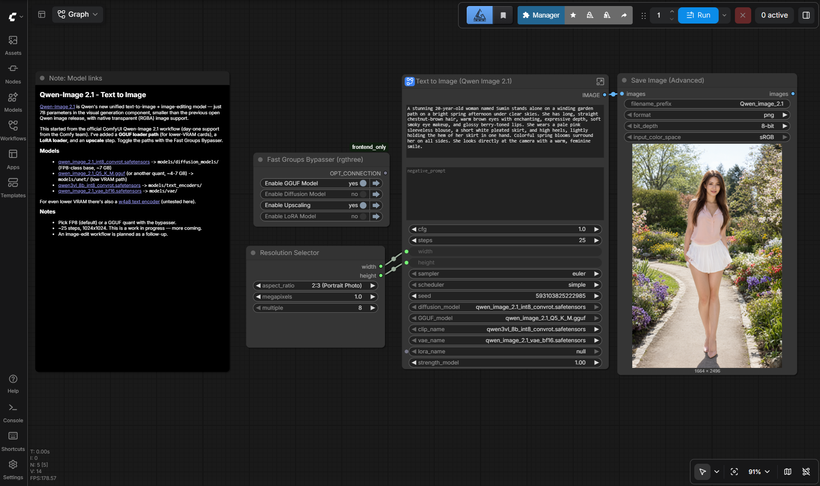
Requirements
- NVIDIA RTX 30XX / 40XX / 50XX GPU
- CUDA-compatible GPU — ~16 GB for the FP8 build, or 6-8 GB with a GGUF quant
- At least 20 GB free storage
Model downloads
- qwen_image_2.1_int8_convrot.safetensors – ~7 GB, the default https://huggingface.co/Comfy-Org/Qwen-Image-2.1/tree/main/diffusion_models
- qwen_image_2.1_Q5_K_M.gguf – low VRAM, ~4-7 GB by quant https://huggingface.co/Abiray/Qwen-Image-2.1-GGUF/tree/main
- qwen3vl_8b_int8_convrot.safetensors https://huggingface.co/Comfy-Org/Qwen-Image-2.1/tree/main/text_encoders
- qwen_image_2.1_vae_bf16.safetensors https://huggingface.co/Comfy-Org/Qwen-Image-2.1/tree/main/vae
- Qwen/Qwen-Image-2.1 https://huggingface.co/Qwen/Qwen-Image-2.1
Custom nodes
- ComfyUI Manager https://github.com/ltdrdata/ComfyUI-Manager
- ComfyUI-GGUF (for the GGUF loader path) https://github.com/city96/ComfyUI-GGUF
- rgthree-comfy https://github.com/rgthree/rgthree-comfy
Setup steps
- Download the free workflow .json with the button above.
- Download the 5 model file(s) listed above into their ComfyUI model folders.
- Install the 3 custom node(s) listed above via ComfyUI Manager, then fully restart ComfyUI.
- Drag the workflow .json onto the ComfyUI canvas and confirm each loader node has the right model selected.
- Run it. If a node shows red, update ComfyUI and restart before troubleshooting anything else.
Notes & tips
- What I Added: GGUF loader path — run a quantized model on lower-VRAM cards, toggled with the Fast Groups Bypasser.; LoRA loader — drop in a Qwen-Image LoRA if you have one.; Upscale step — a clean higher-res pass after the base generation.
- Performance: FP8 model (~7 GB): generates a 1024x1024 image in about 1-2 minutes on 16 GB VRAM at 25 steps.; GGUF models (~4-7 GB depending on quant): should run on 6-8 GB VRAM and still produce good quality — the low-VRAM path.
- Load the workflow and pick your model path — FP8 (default) or GGUF — with the Fast Groups Bypasser.
- ~25 steps at 1024x1024 is a good starting point.
- Write detailed prompts — Qwen's image models are strong at prompt adherence and typography (readable text in images).
- For the low-VRAM path, load your chosen GGUF quant in the Unet Loader GGUF node. Larger quants = better quality, so pick the biggest that fits your card.
- The LoRA and upscale steps are optional — toggle them with the bypasser.
Want the 1-click version?
Skip the manual model downloads and node installs — get a ready-to-run installer, or unlock all 80+ with Local Lab Pro.