Qwen-Image 2.1 Image Edit
The image-edit side of Qwen-Image 2.1 is finally here. Load an image, describe an edit in plain language — "change the jacket to red," "put this person in a snowy street," "remove the background" — and Qwen-Image 2.1 applies it while preserving identity for people and products. It supports up to 10 reference images, local edits via masks or annotations, and it's the same unified 7B model that does text-to-image, so you don't need a separate editing model.
✓ 100% free — download the workflow and run it locally.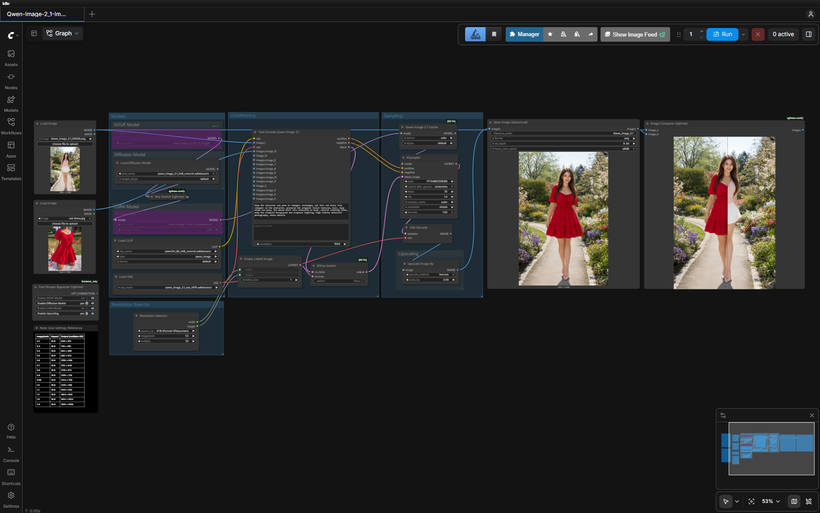
Requirements
- NVIDIA RTX 30XX / 40XX / 50XX GPU
- CUDA-compatible GPU — ~12 GB for FP8, or 6-8 GB with a GGUF quant + the w4a8 encoder
- At least 20 GB free storage
Model downloads
- qwen_image_2.1_int8_convrot.safetensors – ~7 GB, the default https://huggingface.co/Comfy-Org/Qwen-Image-2.1/tree/main/diffusion_models
- qwen_image_2.1_Q5_K_M.gguf – low VRAM, ~4-7 GB by quant https://huggingface.co/Abiray/Qwen-Image-2.1-GGUF/tree/main
- qwen3vl_8b_w4a8.safetensors – extra low-VRAM encoder https://huggingface.co/Comfy-Org/Qwen-Image-2.1/tree/main/text_encoders
- qwen_image_2.1_vae_bf16.safetensors – required https://huggingface.co/Comfy-Org/Qwen-Image-2.1/tree/main/vae
- Qwen/Qwen-Image-2.1 https://huggingface.co/Qwen/Qwen-Image-2.1
Custom nodes
- ComfyUI Manager https://github.com/ltdrdata/ComfyUI-Manager
- ComfyUI-GGUF (for the GGUF loader path) https://github.com/city96/ComfyUI-GGUF
- rgthree-comfy (Image Comparer, bypasser) https://github.com/rgthree/rgthree-comfy
Setup steps
- Download the free workflow .json with the button above.
- Download the 5 model file(s) listed above into their ComfyUI model folders.
- Install the 3 custom node(s) listed above via ComfyUI Manager, then fully restart ComfyUI.
- Drag the workflow .json onto the ComfyUI canvas and confirm each loader node has the right model selected.
- Run it. If a node shows red, update ComfyUI and restart before troubleshooting anything else.
Notes & tips
- What's in the Workflow: GGUF loader path — run a quantized model on lower-VRAM cards, toggled with the Fast Groups Bypasser.; LoRA slot — load your own Qwen-Image LoRA if you have one (optional, toggle it off if not).; Image Comparer — see before/after side by side.; Resolution controls — Qwen-Image 2.1 supports native 2K (up to 2048x2048).
- Load your source image through the Load Image node, and pick your model path (FP8 or GGUF) with the Fast Groups Bypasser.
- Describe the edit in plain language — Qwen-Image 2.1 is instruction-driven, so "make the sky sunset orange" works better than keyword soup.
- For multi-image edits, you can supply up to 10 reference images; the output follows the first image's canvas.
- Output follows image_1's size — keep custom resolution close to the resized source, or the edit can shift.
- The LoRA slot is optional — load a Qwen-Image LoRA or leave it bypassed.
- Use the Image Comparer to check your edit against the original.
More resources
- FREE Qwen-Image 2.1 Text-to-Image Workflow https://www.patreon.com/TheLocalLab/posts/free-qwen-image-170111541
Want the 1-click version?
Skip the manual model downloads and node installs — get a ready-to-run installer, or unlock all 80+ with Local Lab Pro.