Qwen-Image 2.1 Background Removal
A simple, free background-removal workflow for Qwen-Image 2.1. It's the background-removal workflow that shipped alongside my other Qwen 2.1 workflows — I just added a 4-step acceleration LoRA to speed it up and an upscale node to enlarge the result. Nothing fancy: load an image, run it, get a clean cutout back.
✓ 100% free — download the workflow and run it locally.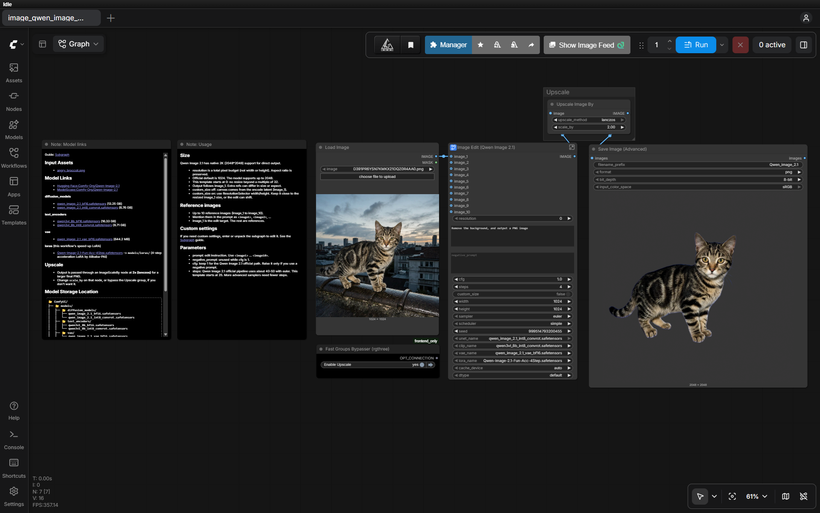
Requirements
- NVIDIA RTX 30XX / 40XX / 50XX GPU
- CUDA-compatible GPU — ~16 GB for int8 (use a GGUF quant for less)
- At least 20 GB free storage
Model downloads
- Qwen-Image-2.1-Fun-Acc-4Step.safetensors — 4-step acceleration LoRA by Alibaba-PAI https://huggingface.co/alibaba-pai/Qwen-Image-2.1-Fun-Acc-LoRAs/tree/main/models
- qwen_image_2.1_int8_convrot.safetensors – ~7 GB https://huggingface.co/Comfy-Org/Qwen-Image-2.1/tree/main/diffusion_models
- qwen3vl_8b_int8_convrot.safetensors https://huggingface.co/Comfy-Org/Qwen-Image-2.1/tree/main/text_encoders
- qwen_image_2.1_vae_bf16.safetensors https://huggingface.co/Comfy-Org/Qwen-Image-2.1/tree/main/vae
- Qwen/Qwen-Image-2.1 https://huggingface.co/Qwen/Qwen-Image-2.1
- Alibaba-PAI https://huggingface.co/alibaba-pai/Qwen-Image-2.1-Fun-Acc-LoRAs
Custom nodes
- ComfyUI Manager https://github.com/ltdrdata/ComfyUI-Manager
- rgthree-comfy (Fast Groups Bypasser) https://github.com/rgthree/rgthree-comfy
Setup steps
- Download the free workflow .json with the button above.
- Download the 6 model file(s) listed above into their ComfyUI model folders.
- Install the 2 custom node(s) listed above via ComfyUI Manager, then fully restart ComfyUI.
- Drag the workflow .json onto the ComfyUI canvas and confirm each loader node has the right model selected.
- Run it. If a node shows red, update ComfyUI and restart before troubleshooting anything else.
Notes & tips
- What It Does: Removes the background from your image and outputs a PNG (the prompt is simply "Remove the background, and output a PNG image").; Runs in 4 steps instead of the usual 25, thanks to the Fun-Acc 4-step LoRA — much faster per image.; Passes the result through a 2× lanczos upscale for a larger final PNG.
- Qwen-Image-2.1-Fun-Acc-4Step.safetensors (place in ComfyUI/models/loras/) — 4-step acceleration LoRA by Alibaba-PAI — Hugging Face Repo
- Load your image in the Load Image node and run — the background-removal prompt is already set.
- Settings: steps 4, cfg 1, sampler euler, scheduler simple, LoRA strength 1.0.
- The Upscale group runs a 2× lanczos pass. Change scale_by on the ImageScaleBy node, or bypass the group with the Fast Groups Bypasser, if you don't want it.
- Output is saved as a PNG.
- More Qwen 2.1: Qwen-Image 2.1 All-in-One One-Click Installer (Patreon) - https://www.patreon.com/TheLocalLab/posts/qwen-image-2-1-170300735
More resources
- Qwen-Image 2.1 All-in-One One-Click Installer (Patreon) https://www.patreon.com/TheLocalLab/posts/qwen-image-2-1-170300735
Want the 1-click version?
Skip the manual model downloads and node installs — get a ready-to-run installer, or unlock all 80+ with Local Lab Pro.