Official Qwen-Image 2.1 Turbo
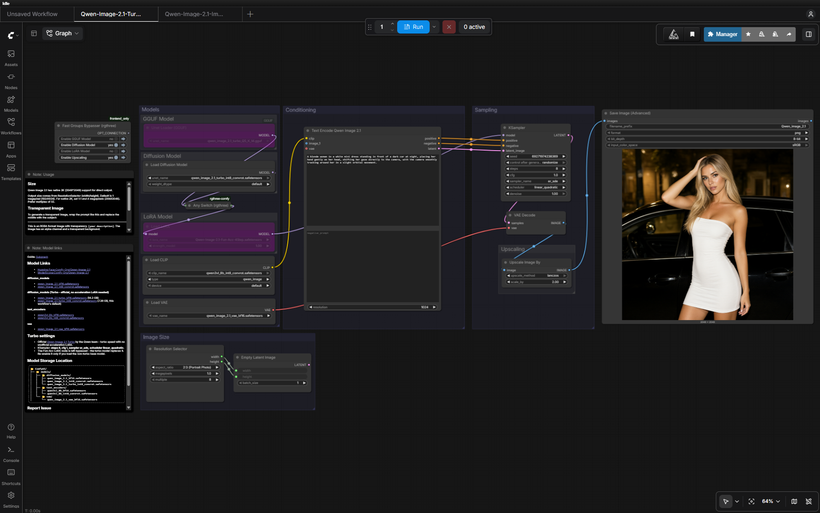
The Qwen team just released an official Turbo version of Qwen-Image 2.1 — turbo speed baked right into the model, so you get fast generations without needing the unofficial acceleration LoRAs anymore. It had ComfyUI support on day one, and it drops straight into the existing Qwen 2.1 workflows: same pipeline, just swap in the turbo diffusion model and use the new sampler/scheduler settings.
✓ 100% free — download the workflow and run it locally.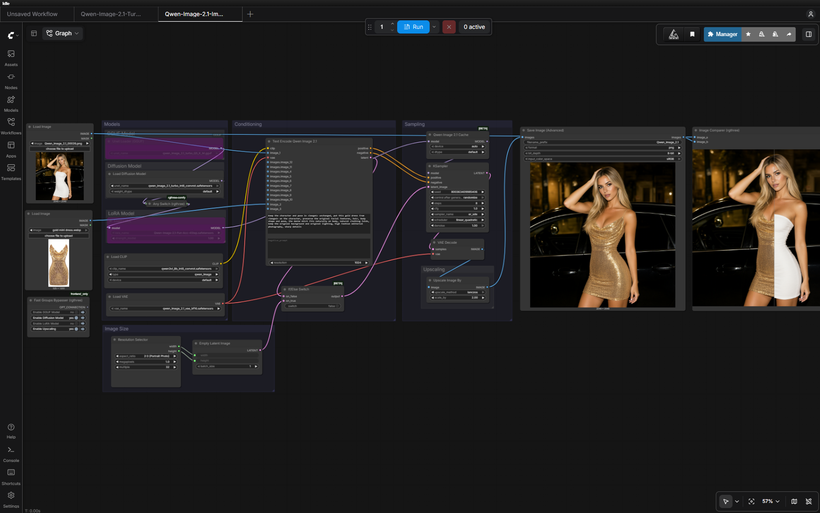
Preview
Requirements
- NVIDIA RTX 30XX / 40XX / 50XX GPU
- CUDA-compatible GPU — ~16 GB for int8 (use a GGUF quant for less)
- At least 20 GB free storage
Model downloads
- qwen_image_2.1_turbo_int8_convrot.safetensors — 7.26 GB, the workflow default https://huggingface.co/Comfy-Org/Qwen-Image-2.1/tree/main/diffusion_models
- Qwen/Qwen-Image-2.1-Turbo https://huggingface.co/Qwen/Qwen-Image-2.1-Turbo
- qwen3vl_8b_bf16.safetensors – full precision https://huggingface.co/Comfy-Org/Qwen-Image-2.1/tree/main/text_encoders
- qwen_image_2.1_vae_bf16.safetensors https://huggingface.co/Comfy-Org/Qwen-Image-2.1/tree/main/vae
Custom nodes
- ComfyUI Manager https://github.com/ltdrdata/ComfyUI-Manager
- ComfyUI-GGUF (optional GGUF loader path) https://github.com/city96/ComfyUI-GGUF
- rgthree-comfy (Image Comparer, bypasser) https://github.com/rgthree/rgthree-comfy
Setup steps
- Download the free workflow .json with the button above.
- Download the 4 model file(s) listed above into their ComfyUI model folders.
- Install the 3 custom node(s) listed above via ComfyUI Manager, then fully restart ComfyUI.
- Drag the workflow .json onto the ComfyUI canvas and confirm each loader node has the right model selected.
- Run it. If a node shows red, update ComfyUI and restart before troubleshooting anything else.
Notes & tips
- What's New: Official Turbo diffusion model by the Qwen team — no community LoRA required. The acceleration LoRA node is left bypassed in both workflows.; New sampler/scheduler settings tuned for Turbo: 8 steps, cfg 1, sampler er_sde, scheduler linear_quadratic.; Everything else is the same as before — same encoders, VAE, up to 10 reference images on the edit side, and the 2× upscale pass.
- The Turbo Models: qwen_image_2.1_turbo_bf16.safetensors — 14.2 GB, full precision – Hugging Face Repo; qwen_image_2.1_turbo_int8_convrot.safetensors — 7.26 GB, the workflow default – Hugging Face Repo
- Settings: Steps: 8; CFG: 1; Sampler: er_sde; Scheduler: linear_quadratic
- Pick the turbo diffusion model in the UNETLoader (int8 for most cards, bf16 for full precision).
- Keep the settings above (8 steps / er_sde / linear_quadratic / cfg 1). The acceleration LoRA node stays bypassed.
- Text-to-image: set your size in the Resolution Selector. Native 2K supported (1:1 at 4 MP = 2048×2048).
- Image edit: load your target as image_1 and references as image_2+, describe the edit in plain language using <image1>, <image2>, etc.
- Both workflows include a 2× lanczos upscale pass.
- More Qwen 2.1: FREE Qwen-Image 2.1 Text-to-Image Workflow - (link); FREE Qwen-Image 2.1 Image Edit Workflow - (link); Qwen-Image 2.1 All-in-One One-Click Installer (Patreon) - https://www.patreon.com/TheLocalLab/posts/qwen-image-2-1-170300735
More resources
- Qwen-Image 2.1 All-in-One One-Click Installer (Patreon) https://www.patreon.com/TheLocalLab/posts/qwen-image-2-1-170300735
Want the 1-click version?
Skip the manual model downloads and node installs — get a ready-to-run installer, or unlock all 80+ with Local Lab Pro.