Krea 2 Turbo + Clio Style Library
This is my Krea 2 Turbo text-to-image workflow, upgraded with the new Clio Style Library node. Instead of hand-writing a style into every prompt, you pick one from a dropdown of ~281 built-in art styles and the node injects a full style description right into your prompt for you — so you get consistent, on-style images with almost no extra typing. In my testing it stays true to most styles; a few miss, but those are usually fixable with a little more prompt detail. Overall it holds the look really well.
✓ 100% free — download the workflow and run it locally.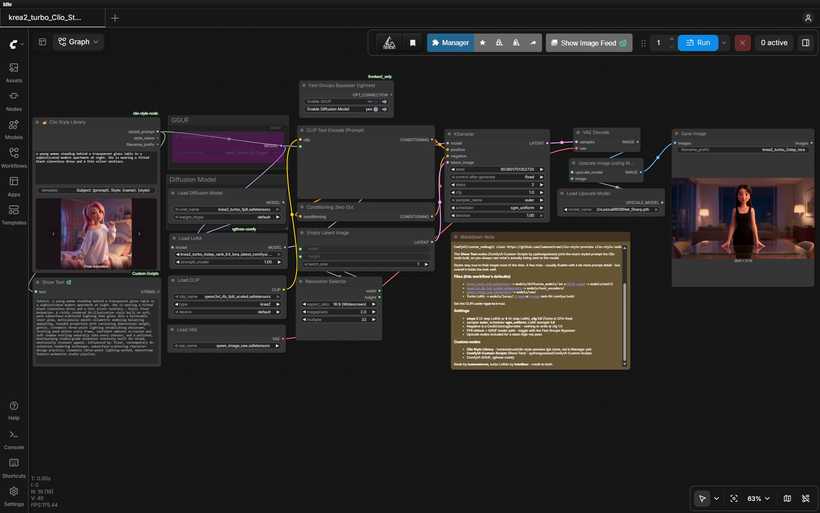
Requirements
- NVIDIA RTX 30XX / 40XX / 50XX GPU
- CUDA-compatible GPU — FP8 for 16 GB+, or a GGUF quant for smaller cards
- At least 20 GB free storage
Model downloads
- lvladikov https://huggingface.co/lvladikov/Krea2-Turbo-Distill-2step-LoRA
- Krea 2 Turbo FP8 – the workflow default https://huggingface.co/AlperKTS/Krea2_FP8/tree/main
- Krea 2 Turbo GGUF – low VRAM option, pick your quant https://huggingface.co/vantagewithai/Krea-2-Turbo-GGUF/tree/main
- qwen3vl_4b_fp8_scaled.safetensors https://huggingface.co/Comfy-Org/Qwen3-VL/tree/main/text_encoders
- qwen_image_vae.safetensors https://huggingface.co/Comfy-Org/Qwen-Image_ComfyUI/tree/main/split_files/vae
- krea2_turbo_2step_rank_64_lora_comfyui.safetensors – fastest, 2 steps – lvladikov/Krea2-Turbo-Distill-2step-LoRA https://huggingface.co/lvladikov/Krea2-Turbo-Distill-2step-LoRA/tree/main
- krea2_turbo_4step_rank_64_lora_latest_comfyui.safetensors – a touch more refinement, 4 steps – lvladikov/Krea2-Turbo-Distill-4step-LoRA https://huggingface.co/lvladikov/Krea2-Turbo-Distill-4step-LoRA/tree/main
Custom nodes
- Clio Style Library (git clone, not in Manager yet) https://github.com/lumenastrum/clio-style-preview
- ComfyUI Manager https://github.com/ltdrdata/ComfyUI-Manager
- ComfyUI-Custom-Scripts (Show Text node) https://github.com/pythongosssss/ComfyUI-Custom-Scripts
- ComfyUI-GGUF (for the GGUF loader path) https://github.com/city96/ComfyUI-GGUF
- rgthree-comfy https://github.com/rgthree/rgthree-comfy
Setup steps
- Download the free workflow .json with the button above.
- Download the 7 model file(s) listed above into their ComfyUI model folders.
- Install the 5 custom node(s) listed above via ComfyUI Manager, then fully restart ComfyUI.
- Drag the workflow .json onto the ComfyUI canvas and confirm each loader node has the right model selected.
- Run it. If a node shows red, update ComfyUI and restart before troubleshooting anything else.
Notes & tips
- What's New in This Workflow: Clio Style Library node — a dropdown of ~281 art styles. Pick one and it auto-injects a detailed style description into your prompt. Great for locking a series of images to the same look.; Show Text nodes — these display the exact styled prompt the Clio node generated, so you always know precisely what's being sent to the model (no guessing what the style added).; Works with the 2-step and 4-step turbo LoRAs — for even faster gens on top of the style injection.; Everything from the base turbo workflow: FP8 + GGUF loader paths, Resolution Selector, and an upscale pass.
- Type your subject in the Clio Style node's prompt field, pick a style from the dropdown, and it builds the full styled prompt automatically.
- Check the Show Text node to see the exact prompt that was generated and sent to the model — handy for learning what each style adds, or for copying a style prompt to reuse.
- Settings: steps 2 (2-step LoRA) or 4 (4-step LoRA), cfg 1.0 (Turbo is CFG-free), sampler euler, scheduler sgm_uniform, LoRA strength 1.0.
- The negative prompt is a ConditioningZeroOut — at cfg 1.0 there's nothing to write in it.
- Pick your model path — FP8 (default) or GGUF — with the Fast Groups Bypasser.
- Styles hold their look most of the time. If one misses, add a bit more detail to your subject prompt to steer it back.
- Use the upscale pass for a clean higher-res result after the fast base generation.
- More Krea 2: FREE Krea 2 Turbo 2-Step LoRA Workflow - https://www.patreon.com/TheLocalLab/posts/free-krea-2-2-2-169741484; FREE Krea 2 Turbo 4-Step LoRA Workflow - https://www.patreon.com/TheLocalLab/posts/free-krea-2-4-2-167722336; ComfyUI Krea 2 All-in-One Installer (Patreon) — now installs the Clio Style node automatically, plus the T2I, Identity Edit, and Depth ControlNet workflows - https://www.patreon.com/TheLocalLab/posts/krea-2-all-in-6-163760558; Krea 2 RunPod Template - https://get.runpod.io/Krea2-ComfyUI
More resources
- FREE Krea 2 Turbo 2-Step LoRA Workflow https://www.patreon.com/TheLocalLab/posts/free-krea-2-2-2-169741484
- FREE Krea 2 Turbo 4-Step LoRA Workflow https://www.patreon.com/TheLocalLab/posts/free-krea-2-4-2-167722336
- ComfyUI Krea 2 All-in-One Installer (Patreon) — now installs the Clio Style node automatically, plus the T2I, Identity Edit, and Depth ControlNet workflows https://www.patreon.com/TheLocalLab/posts/krea-2-all-in-6-163760558
- Krea 2 RunPod Template https://get.runpod.io/Krea2-ComfyUI
Want the 1-click version?
Skip the manual model downloads and node installs — get a ready-to-run installer, or unlock all 80+ with Local Lab Pro.