Krea 2 Identity Image Edit LoRA
The Krea 2 Identity Image Edit LoRA brings instruction based, identity preserving image editing to Krea 2 in ComfyUI. You give it an image and a plain language instruction — "create a photo of this person at a night market" — and it makes the edit while keeping the person's face, outfit, skin texture, and distinguishing marks intact, fully relit into the new scene, leaving everything you didn't ask to change untouched. It also handles local edits like recoloring, adding, removing, or replacing objects with near pixel preservation of the rest of the frame, full image restyles that hold composition, and two input edits where you supply a scene and a person as separate references.
✓ 100% free — download the workflow and run it locally.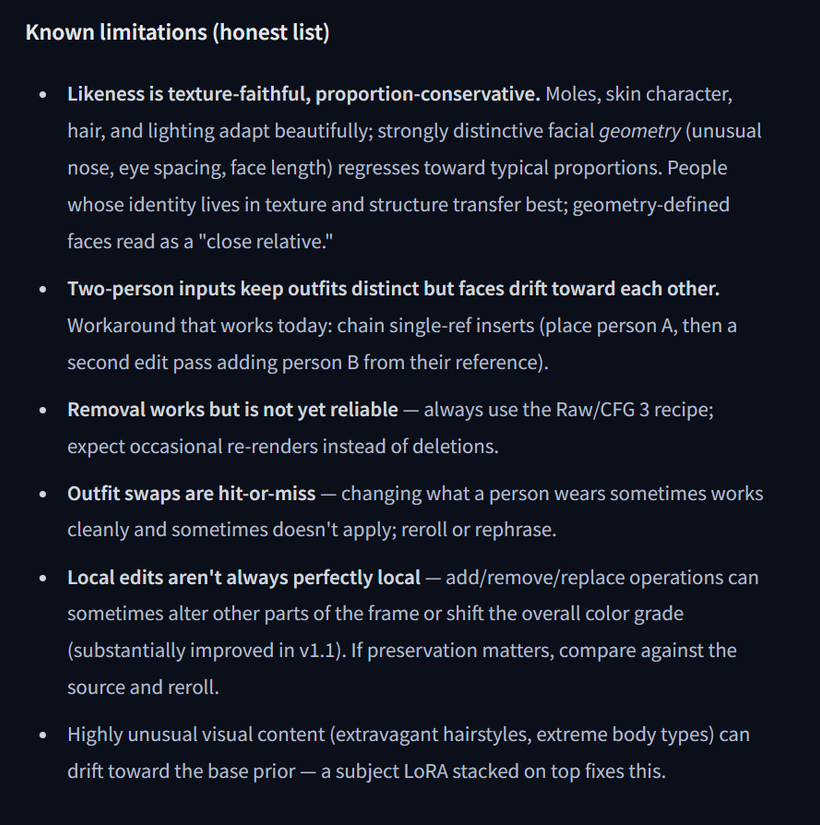
Preview
Requirements
- NVIDIA RTX 30XX / 40XX / 50XX GPU (FP8 supported)
- CUDA-compatible GPU (minimum 6 GB VRAM)
- At least 20 GB free storage
Model downloads
- Hugging Face: conradlocke/krea2-identity-edit https://huggingface.co/conradlocke/krea2-identity-edit
- Krea 2 Turbo GGUF https://huggingface.co/vantagewithai/Krea-2-Turbo-GGUF/tree/main
- Krea 2 Turbo FP8 https://huggingface.co/AlperKTS/Krea2_FP8/tree/main
- qwen3vl_4b_fp8_scaled.safetensors https://huggingface.co/Comfy-Org/Qwen3-VL/tree/main/text_encoders
- qwen_image_vae.safetensors https://huggingface.co/Comfy-Org/Qwen-Image_ComfyUI/tree/main/split_files/vae
- krea2_identity_edit_v1_2.safetensors https://huggingface.co/conradlocke/krea2-identity-edit/tree/main
Custom nodes
- Custom Node used in my workflow: lbouaraba/comfyui-krea2edit https://github.com/lbouaraba/comfyui-krea2edit
- https://github.com/lbouaraba/comfyui-krea2edit.git
- ComfyUI Manager https://github.com/ltdrdata/ComfyUI-Manager
Setup steps
- Download the 6 model file(s) listed below and place each one into ComfyUI/models/diffusion_models, ComfyUI/models/loras, ComfyUI/models/text_encoders, ComfyUI/models/unet, ComfyUI/models/vae.
- Install the 3 custom node(s) listed below via ComfyUI Manager, then fully restart ComfyUI.
- Download the workflow .json from the button above and drag it onto the ComfyUI canvas.
- Open each loader node and confirm the model files are selected — a fresh install often defaults to the wrong one.
- Run the workflow. If a node shows red, update ComfyUI and restart before troubleshooting anything else.
Notes & tips
- What's included: Hugging Face: conradlocke/krea2-identity-edit; Custom Node used in my workflow: lbouaraba/comfyui-krea2edit
- Load the provided workflow into ComfyUI.
- Verify all model checkpoints are mapped correctly in your Loader nodes.
- Use the "Fast Group Bypass" toggle to quickly switch between model types and 1 or 2 reference images without rebuilding chains.
- If you're using 2 references, the input order is fixed and matters. The scene always goes in first as image A (source_latent / image), and the person always goes in second as image B (source_latent_b / image_b). Load both through the "Load Image" nodes. Feeding them in the wrong order is the quickest way to get an edit that ignores half of what you gave it.
- When using text prompts, keep them descriptive but concise, explaining what should happen in the scene. A two reference prompt reads naturally, like "create a photo of this man next to the tractor" — the scene is the tractor, the person is the man.
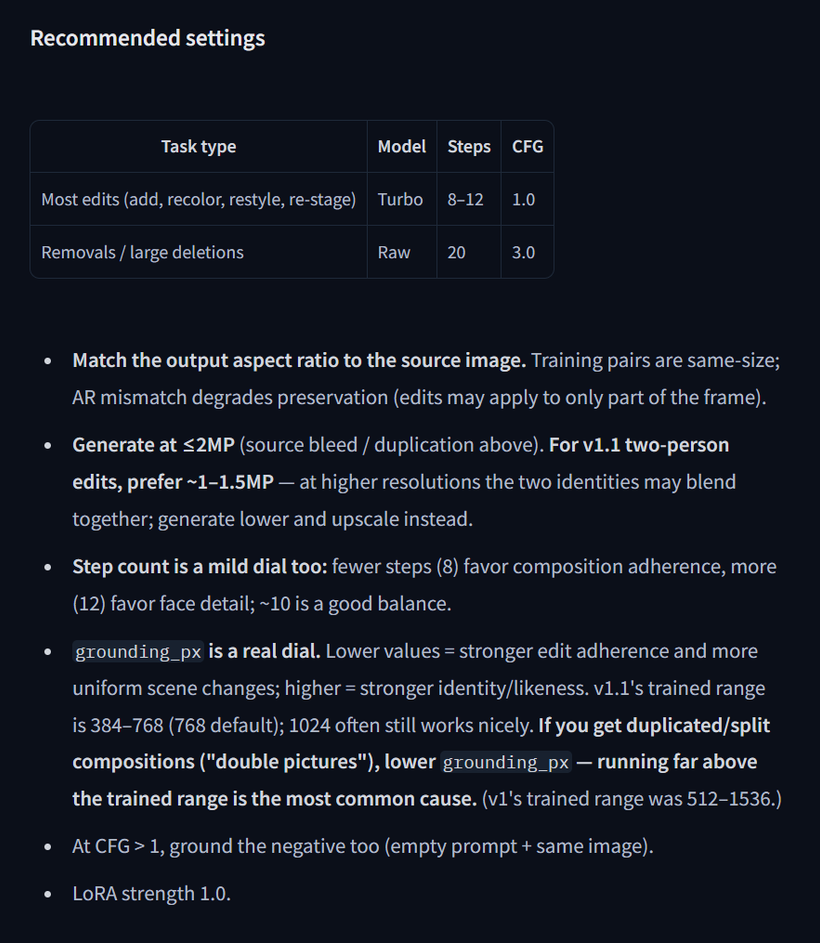
- Match your output aspect ratio to your source image. Training pairs were the same size, so a mismatch degrades preservation and the edit may only apply to part of the frame.
- Generate at or below 2 MP. For two reference edits, stay around 1–1.5 MP and upscale afterward — at higher resolutions the two identities can start bleeding into each other.
- grounding_px is the real quality dial. Lower values give stronger edit adherence and more uniform scene changes, higher values give stronger identity and likeness. The trained range for v1.1 is 384–768 with 768 as the default. If you get duplicated or split "double picture" compositions, lower it — running far above the trained range is the most common cause.
- Step count is a mild dial as well. Fewer steps (8) favor composition adherence, more (12) favor face detail, and around 10 is a good balance.
- Keep LoRA strength at 1.0.
- Likeness is texture faithful but proportion conservative. Moles, skin character, hair, and lighting transfer beautifully, while strongly distinctive facial geometry pulls back toward typical proportions and can read as a close relative rather than the exact person.
- Outfit swaps and object removal are the weakest operations right now. Expect to reroll or rephrase rather than assuming the workflow is broken.
More resources
- https://www.patreon.com/TheLocalLab/posts/krea-2-image-in-162660487
- https://www.patreon.com/TheLocalLab/posts/krea-2-all-in-6-163760558
- https://www.locallabdigest.com/product-page/krea-2-image-model-in-stable-forge-ui-neo-6-gb-vram-one-click-installer
- https://www.patreon.com/TheLocalLab/posts/free-krea-2-text-161915897
- https://www.patreon.com/TheLocalLab/posts/free-krea-2-to-163084570
- https://youtu.be/o5xpagC6Bkc
- Related video — Krea 2 in Forge Neo — model overview https://youtu.be/o5xpagC6Bkc
Want the 1-click version?
Skip the manual model downloads and node installs — get a ready-to-run installer, or unlock all 75+ with Local Lab Pro.