What Is TradingAgents-GUI?
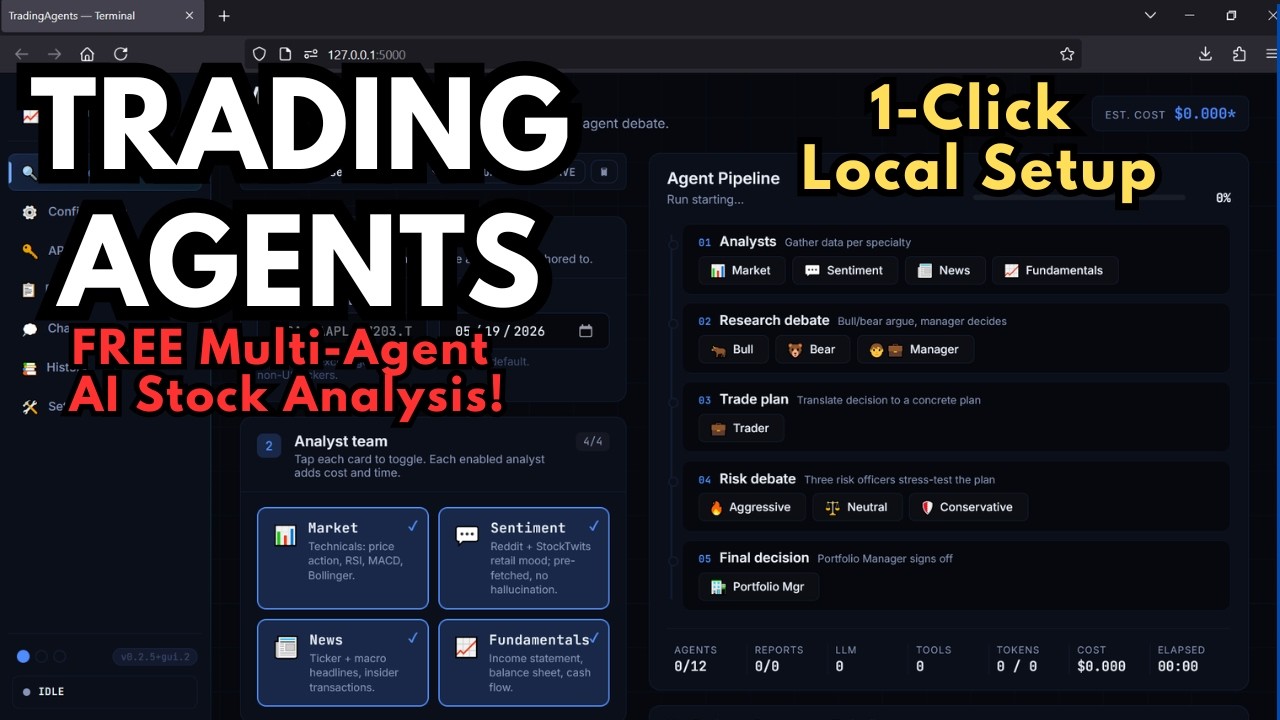
TradingAgents-GUI is a locally-running graphical interface built on top of the open-source TauricResearch/TradingAgents framework. It lets you spin up a full team of AI analyst agents — Bull, Bear, Fundamentals, Sentiment, News, and Risk — and have them debate a stock, then deliver a final BUY, SELL, or HOLD verdict. The entire process runs on your own machine using your choice of LLM API.
The Local Lab fork adds a polished web UI, real-time agent progress tracking, multi-session chat, report export, and a one-click Windows installer — making the original framework accessible without the command-line setup.
How the Multi-Agent Analysis Works
TradingAgents doesn't just ask one model "is this stock good?" — it runs a structured debate. Each agent has a distinct role and perspective:
- Bull Analyst — argues the bullish case, focusing on growth catalysts and upside
- Bear Analyst — challenges assumptions and identifies risks and downside scenarios
- Fundamentals Agent — evaluates financials: revenue, margins, P/E, balance sheet
- Sentiment Agent — reads market sentiment signals and investor positioning
- News Agent — surfaces recent news and events that could affect the stock
- Risk Agent — synthesizes all agent outputs and delivers the final risk-weighted verdict
The result is a layered analysis that surfaces both the bull and bear case before landing on a final recommendation — much closer to how a real research team would work than a single-shot prompt ever could be.
Supported LLM Providers
TradingAgents-GUI works with any LLM provider that offers an API key. You'll need at least one of the following:
- OpenAI — GPT-4o, GPT-4-turbo, GPT-3.5-turbo
- Anthropic — Claude 3.5, Claude 3 (Haiku, Sonnet, Opus)
- Google — Gemini Pro, Gemini Flash
- Qwen (CN region) — via dual-region provider support
- GLM / MiniMax (CN region) — also supported out of the box
You configure your preferred provider through the built-in first-run setup wizard — no editing config files manually.
Report Depth Control
Before running an analysis you can choose between three report modes:
- Concise — quick summary, lower token usage, faster results
- Standard — balanced depth, good for most use cases
- Comprehensive — full deep-dive with maximum agent reasoning and detail
Three Built-In Themes
The UI ships with three visual themes you can switch between at any time:
- Terminal — dark, minimal, monospace-heavy
- Modern — clean light/dark hybrid
- Bloomberg — mimics the look of professional financial terminals
Installation — One-Click Windows Installer
The fastest way to get running on Windows is the one-click installer, which includes portable Python 3.11 and Git so you don't need to install anything beforehand.
Manual Installation
Prefer to install manually? You'll need Python 3.10 or higher (3.11 recommended) and optionally Git.
- Clone the repository
- Run the Windows installer script
On macOS or Linux:
- Launch the app — after installation completes, run the start script. The web UI will open in your browser automatically.
- First-run wizard — on first launch, the setup wizard walks you through entering your LLM API key and selecting your preferred provider. No config file editing required.
- Run an analysis — go to the Analyze tab, enter a stock ticker, choose your report depth, and click Analyze. The live pipeline shows each agent's progress in real time.
What Makes It Different from Asking ChatGPT?
Asking a single LLM "should I buy NVDA?" gives you one perspective with no checks or balances. TradingAgents runs multiple specialized agents that actively challenge each other — the Bull agent has to survive scrutiny from the Bear agent before the Risk agent makes a final call. The structured debate produces more nuanced analysis than a single-shot prompt, and the full reasoning chain is saved in the report for you to audit.
Running it locally means your queries aren't logged by a third-party service, and you're only paying for raw API calls — no per-query markup on top.
⭐ Want all Local Lab installers in one place?
Local Lab Pro gives you instant access to every one-click installer we've built — including TradingAgents-GUI — for one flat monthly price.
View Local Lab Pro →