YuE2 Song Generator
YuE2-3B is a new open lyrics-to-song model from the m-a-p team, and it's one of the strongest local Suno alternatives yet — it actually outscores Suno v5 on the WildSongBench benchmark. Give it lyrics and a style description and it generates a complete song with vocals and accompaniment in 48kHz stereo, plus an editable melody/chord score layer you can revise before rendering. It's got native ComfyUI support, so it runs right in your graph — no subscription, no credit meter.
✓ 100% free — download the workflow and run it locally.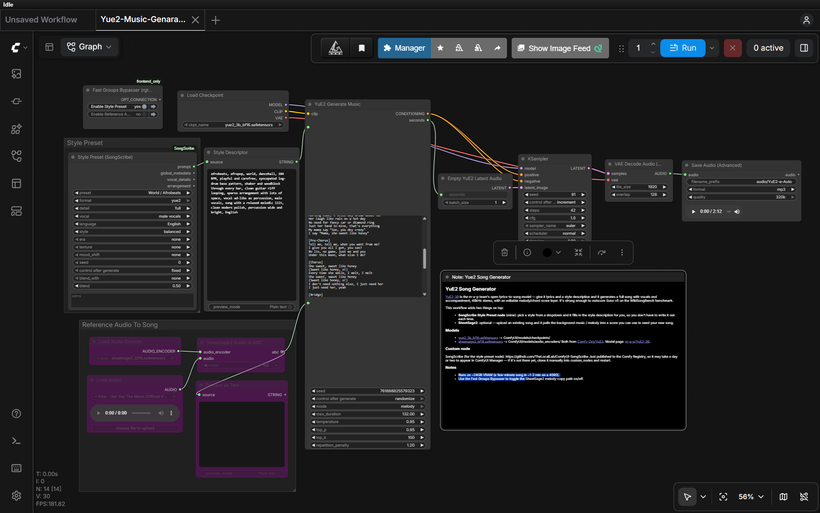
Requirements
- NVIDIA RTX 30XX / 40XX / 50XX GPU
- Runs on 8 GB VRAM + 16 GB system RAM (tested) — far lighter than the official benchmark figures suggest. If you're under ~6 GB, try the int8 quantized checkpoint above (untested at the very low end, but that's its purpose)
- At least 20 GB free storage
Model downloads
- yue2_3b_int8_convrot.safetensors – low-VRAM quantized option https://huggingface.co/Comfy-Org/YuE2/tree/main/checkpoints
- sheetsage2_bf16.safetensors – for the melody-copy feature https://huggingface.co/Comfy-Org/YuE2/tree/main/audio_encoders
- m-a-p/YuE2-3B https://huggingface.co/m-a-p/YuE2-3B
Custom nodes
- ComfyUI-SongScribe (the style-preset node) https://github.com/TheLocalLab/ComfyUI-SongScribe
- https://github.com/TheLocalLab/ComfyUI-SongScribe.git
- ComfyUI Manager https://github.com/ltdrdata/ComfyUI-Manager
- rgthree-comfy https://github.com/rgthree/rgthree-comfy
Setup steps
- Download the free workflow .json with the button above.
- Download the 3 model file(s) listed above into their ComfyUI model folders.
- Install the 4 custom node(s) listed above via ComfyUI Manager, then fully restart ComfyUI.
- Drag the workflow .json onto the ComfyUI canvas and confirm each loader node has the right model selected.
- Run it. If a node shows red, update ComfyUI and restart before troubleshooting anything else.
Notes & tips
- Load the workflow and confirm both models are selected — the YuE2 checkpoint and the SheetSage2 audio encoder.
- Style preset: pick a style from the SongScribe node's dropdown and it fills the style description automatically. You can still edit it after if you want.
- Lyrics: write your lyrics in the lyrics input. YuE2 works best with clear structure.
- Copy a melody (optional): load an existing song through the Load Audio node and enable the SheetSage2 path with the Fast Groups Bypasser to pull its melody/background into a score for your new song. Leave it bypassed if you're generating from scratch.
- Keep first generations short to dial in your style and lyrics before committing to a full track.
More resources
Want the 1-click version?
Skip the manual model downloads and node installs — get a ready-to-run installer, or unlock all 80+ with Local Lab Pro.