RunPod Template Collection — Run Any Model in the Cloud
This one's a little different. Instead of a single workflow or installer, this is the master list — every RunPod template I've built and maintain, all in one place, with the tutorial video for each and the GPU I'd actually rent to run it.
✓ Free templates — you only pay RunPod for the GPU time you use.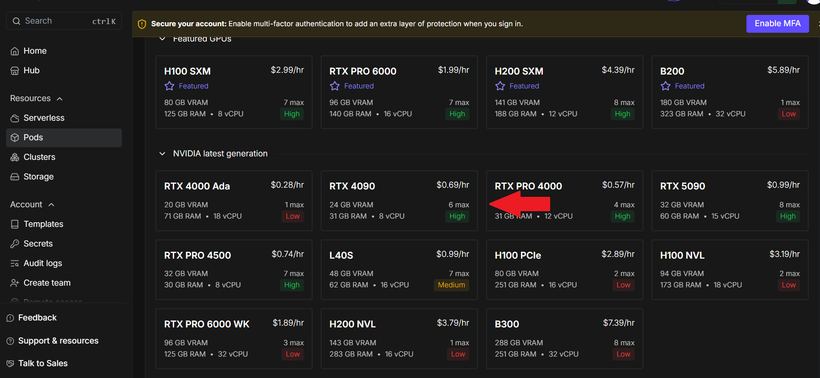
Preview
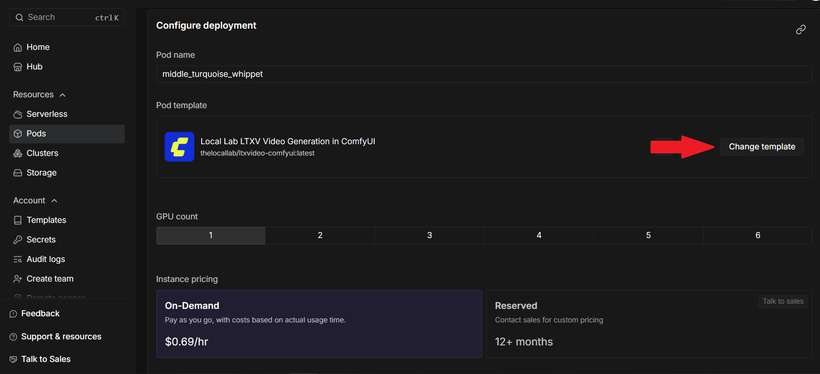
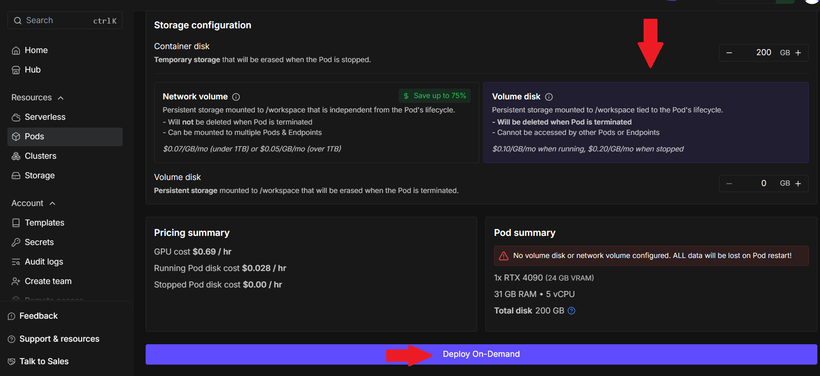
Setup steps
- Getting Started - Full Setup Walkthrough
- Port 8188 — ComfyUI. This is the one you want for the ComfyUI templates.
- Port 8888 — JupyterLab, for file management and terminal access.
- Port 7860 — Gradio, used by the non-ComfyUI templates.
Notes & tips
- What Cloud GPU Actually Solves: You don't have an NVIDIA GPU at all. Mac, laptop, integrated graphics — doesn't matter. Everything runs in your browser.; You have 6-8 GB VRAM and you're tired of Q3 quants. Rent a 24 GB card for an hour and run the full precision model.; You want to test before you buy. Renting a 5090 for two hours costs about two dollars. That's a much better way to find out if a GPU is worth $2,000 than reading benchmarks.; Your generation takes 15 minutes locally. On a proper card it takes one. When you're iterating on a prompt, that difference is the whole experience.; You want to train a LoRA. Training is where consumer VRAM really falls over, and where renting makes the most sense.; You don't want to install anything. Every template below is preconfigured. No Python, no CUDA versions, no dependency conflicts.
- Stop your pod when you're done. Idle pods bill at the full rate. Set a phone timer if you have to.
- Use a network volume if you'll be back. $0.07/GB/month versus re-downloading your models every single session at GPU rates.
- Check availability before committing to a GPU. A Low availability card may fail to deploy and cost you time.
- Start smaller than you think. Get your prompt and settings dialed in on a 4090, then move to a bigger card only for the final high-resolution run.
- Watch the RTX PRO 4000. 32 GB at $0.57/hr undercuts the 4090 on both VRAM and price. Availability varies, but grab it when it's there.
- Download your outputs before stopping the pod unless you're on a network volume.
More resources
- https://get.runpod.io/Krea2-ComfyUI
- https://get.runpod.io/Minimax-H3-ComfyUI
- https://get.runpod.io/WAN2-2-Video-Template
- Best Local AI Video Generator - Low VRAM WAN 2.2 14B https://youtu.be/tQu0DjtOEyg
- WAN 2.2 SVI 2.0 Pro - Long Length AI Videos I2V https://youtu.be/IfcN1IP7XAA
- https://get.runpod.io/WAN-SCAIL-2
- WAN SCAIL 2 V2V Character Animation Motion Transfer https://youtu.be/QDundeWDjmc
- https://get.runpod.io/LTXV-Generation-ComfyUI
- FASTEST Local AI Video Generator - LTX Video I2V Update https://youtu.be/zBuQe3y6jLM
- LTX 2.3 Outpainting - Infinite AI Video on Low VRAM https://youtu.be/NDkJpj6hYwk
- https://get.runpod.io/WAN2GP-Runpod-Template
- Lip Sync Any AI Model with LTX 2.3 Audio to Video in WAN2GP https://youtu.be/TDZmMRkhHTk
- LTX-2 AI Video - Low VRAM Image to Video with Audio https://youtu.be/TGwog_02a8g
- https://get.runpod.io/Flux-Klein-9B-ComfyUI
- FAST Local AI Face Swap with Flux.2 Klein 9B https://youtu.be/4dakUy14fSo
- Flux.2 Klein Face Swap Realism Fix https://youtu.be/Ij6-2EMoTR0
- https://get.runpod.io/Z-Image-Turbo-ComfyUI
- Easy Local AI Face Swapping with Z-Image Turbo https://youtu.be/fd8nEwRIw0I
- https://get.runpod.io/Qwen-Image-Template
- New Free AI Image Generator from Qwen AI https://youtu.be/D8z2i0WN2zQ
- https://get.runpod.io/Trellis2-3D-ComfyUI
- Best FREE 3D AI Model Generator - Microsoft Trellis 2 https://youtu.be/MxSKaafnqt8
- https://get.runpod.io/Hunyuan-3D-2-1-ComyUI
- Create Next Gen 3D AI Models with Hunyuan 3D 2.1 https://youtu.be/YCFlt0TIeQY
- https://get.runpod.io/AI-Toolkit-Template
- Create Perfect CONSISTENT AI CHARACTERS using Z Image Turbo LoRAs https://youtu.be/uHqOdGsR9cw
- Consistent AI Characters with WAN 2.2 LoRAs https://youtu.be/HlXmji1O_bI
- https://get.runpod.io/FluxGym-Template
- Flux AI LoRA Training - FluxGym Runpod Template w/ Kohya https://youtu.be/d9ZyvxZEkHY
- https://get.runpod.io/VibeVoice-TTS-Template
- Microsoft Free Realistic AI Text To Speech with Voice Cloning https://youtu.be/3kNI_kc78S8
- https://get.runpod.io/Ollama-OpenWebUI-Template
- How to Run Qwen 2.5 Coder 32B Locally on Cloud GPUs with Ollama & OpenWebUI https://youtu.be/gnhSPV1xmi8
Want the 1-click version?
Skip the manual model downloads and node installs — get a ready-to-run installer, or unlock all 80+ with Local Lab Pro.