Qwen Image Edit — Fast 4-Step + LoRA
Run Qwen Image Edit with the fast 4-Step Lightning LoRA for high-quality semantic edits, object manipulation and text rendering in under 90 seconds on 6GB VRAM. Built on Alibaba's 20B Qwen-Image foundation.
✓ 100% free — download the workflow and run it locally.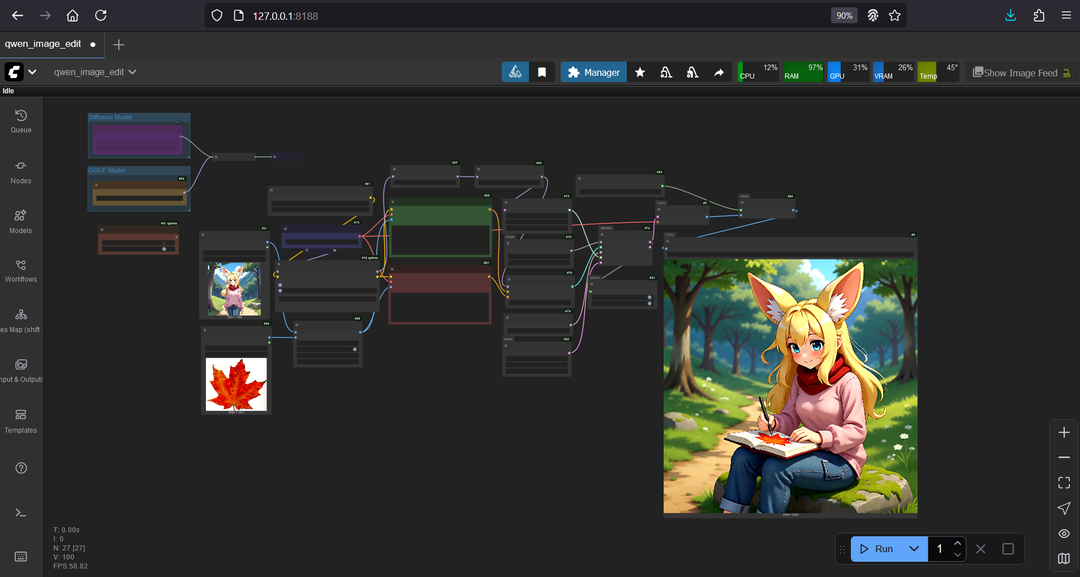
Requirements
- GPU: NVIDIA RTX 30XX/40XX/50XX (FP16)
- VRAM: 6 GB minimum
- OS: Windows
- Storage: 40 GB+ free
Model downloads
- Qwen_Image_Edit Q3_K_S GGUF https://huggingface.co/QuantStack/Qwen-Image-Edit-GGUF/tree/main
- Qwen2.5-VL-7B-Instruct Q4_0 GGUF https://huggingface.co/unsloth/Qwen2.5-VL-7B-Instruct-GGUF/tree/main
- qwen_image_vae.safetensors https://huggingface.co/Comfy-Org/Qwen-Image_ComfyUI/tree/main/split_files/vae
- Qwen-Image-Lightning 4-steps LoRA https://huggingface.co/lightx2v/Qwen-Image-Lightning/tree/main
- 2xLexicaRRDBNet_Sharp (upscaler) https://huggingface.co/Thelocallab/2xLexicaRRDBNet_Sharp/tree/main
- Qwen Image Edit diffusion models (FP16/FP8) https://huggingface.co/Comfy-Org/Qwen-Image-Edit_ComfyUI/tree/main/split_files/diffusion_models
Custom nodes
- ComfyUI Manager https://github.com/ltdrdata/ComfyUI-Manager
- ComfyUI_LayerStyle https://github.com/chflame163/ComfyUI_LayerStyle
- ComfyUI-KJNodes https://github.com/kijai/ComfyUI-KJNodes
- rgthree-comfy https://github.com/rgthree/rgthree-comfy
- ComfyUI-GGUF https://github.com/city96/ComfyUI-GGUF
- RES4LYF https://github.com/ClownsharkBatwing/RES4LYF
Setup steps
- Install the custom nodes above via ComfyUI Manager and place all models in their folders.
- Load the workflow below into ComfyUI.
- Upload up to two input images.
- Write a detailed prompt describing the edit, then run.
Notes & tips
- ~90s for 1024×1024 on an RTX 4050.
- Prefer one-click? A Qwen Image Edit installer is available.
Want the 1-click version?
Skip the manual model downloads and node installs — get a ready-to-run installer, or unlock all 75+ with Local Lab Pro.