MOSS-Image Text-to-Image
A ready-to-run ComfyUI workflow for the new MOSS-Image text-to-image model by the OpenMOSS Team. It's fast — about 5-10 seconds for a 1024×1024 on my setup, noticeably quicker than Qwen-Image 2.1 — and this workflow ships with the 8-step turbo LoRA loaded by default, plus a low-VRAM encoder option and a 2× upscale, so it runs on modest cards.
✓ 100% free — download the workflow and run it locally.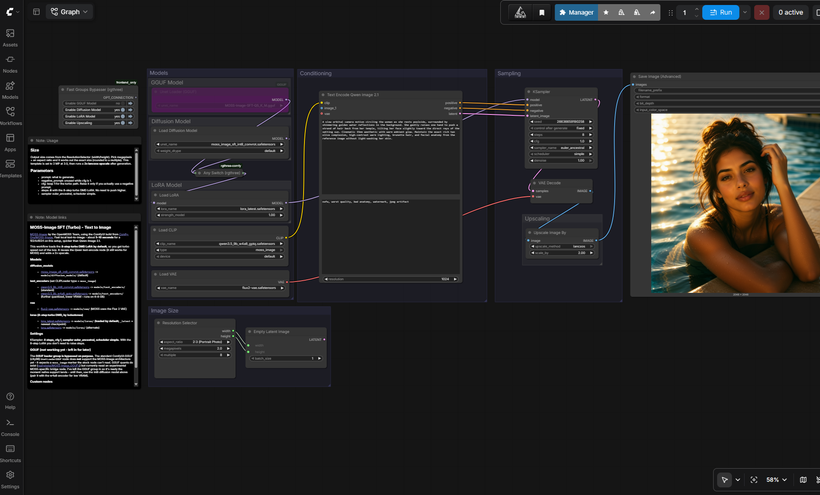
Requirements
- NVIDIA RTX 30XX / 40XX / 50XX GPU
- int8 diffusion + int8 encoder for most cards, or the w4a8 encoder for 6-8 GB VRAM
- At least 20 GB free storage
Model downloads
- moss_image_sft_int8_convrot.safetensors — the default https://huggingface.co/Comfy-Org/MOSS-Image/tree/main/diffusion_models
- qwen3.5_9b_w4a8_gptq.safetensors — further quantized, low VRAM (6-8 GB) https://huggingface.co/Comfy-Org/MOSS-Image/tree/main/text_encoders
- flux2-vae.safetensors — MOSS uses the Flux 2 VAE https://huggingface.co/Comfy-Org/MOSS-Image/tree/main/vae
- lora.safetensors — alternate https://huggingface.co/lodestones/MOSS-Image-SFT-8-steps-dmd/tree/main
- OpenMOSS-Team/MOSS-Image-SFT https://huggingface.co/OpenMOSS-Team/MOSS-Image-SFT
- realrebelai/MOSS-Image_GGUFs https://huggingface.co/realrebelai/MOSS-Image_GGUFs
- Comfy-Org https://huggingface.co/Comfy-Org/MOSS-Image
- lodestones https://huggingface.co/lodestones/MOSS-Image-SFT-8-steps-dmd
Custom nodes
- ComfyUI Manager https://github.com/ltdrdata/ComfyUI-Manager
- rgthree-comfy (Any Switch, Fast Groups Bypasser) https://github.com/rgthree/rgthree-comfy
- ComfyUI-GGUF (for the future GGUF path) https://github.com/city96/ComfyUI-GGUF
Setup steps
- Download the free workflow .json with the button above.
- Download the 8 model file(s) listed above into their ComfyUI model folders.
- Install the 3 custom node(s) listed above via ComfyUI Manager, then fully restart ComfyUI.
- Drag the workflow .json onto the ComfyUI canvas and confirm each loader node has the right model selected.
- Run it. If a node shows red, update ComfyUI and restart before troubleshooting anything else.
Notes & tips
- What's in the Workflow: 8-step turbo DMD LoRA loaded by default — turbo speed out of the box (lora_latest).; Low-VRAM text encoder option — a further-quantized w4a8 GPTQ encoder that should run on 6-8 GB VRAM.; 2× lanczos upscale after generation.; GGUF loader group included but bypassed — ready for when GGUF support lands (see the note below).
- Settings: Steps: 8 (with the turbo DMD LoRA); CFG: 1; Sampler: euler_ancestral; Scheduler: simple
Want the 1-click version?
Skip the manual model downloads and node installs — get a ready-to-run installer, or unlock all 80+ with Local Lab Pro.