MiniMax H3 Video DeltaNet (8-Step)
Video DeltaNet (VDN) is a new hybrid-attention method for MiniMax H3 that speeds up video generation while keeping quality near-lossless. Instead of the standard heavy softmax attention — which costs grow quadratically as your clip gets longer — VDN uses a hybrid design: a sliding-window softmax branch for local frame detail, plus a linear-attention branch for long-range context. The result is an attention cost that scales linearly with clip length, so the longer and higher-resolution your video, the more VDN pays off.
✓ 100% free — download the workflow and run it locally.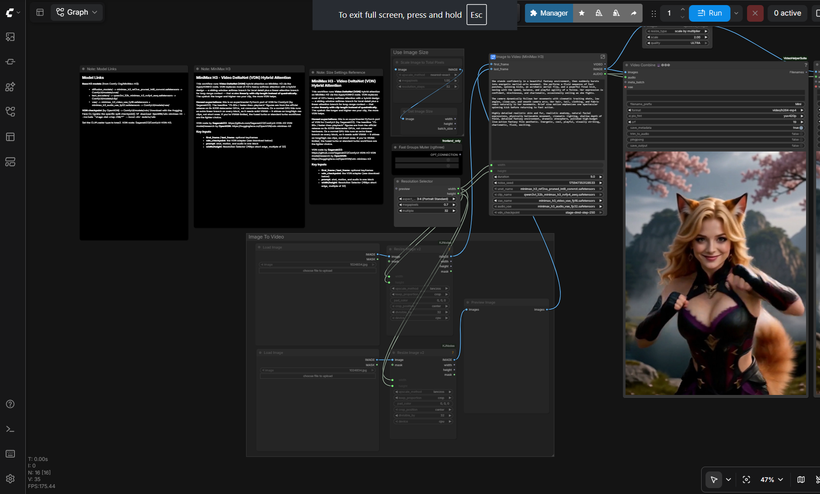
Requirements
- NVIDIA RTX 30XX / 40XX / 50XX GPU — 24 GB VRAM runs it as-is (tested). 16 GB may work if you keep duration short (5s) and resolution low (~0.5 MP)
- Duration is the main VRAM driver — shorten the clip before anything else if you hit out-of-memory
- At least 30 GB free storage
Model downloads
- OpenVDN https://huggingface.co/OpenVDN/vdn-minimax-h3
- Comfy-Org/MiniMax-H3 https://huggingface.co/Comfy-Org/MiniMax-H3
- minimax_h3_ref2va_pruned_int8_convrot.safetensors https://huggingface.co/Comfy-Org/MiniMax-H3/tree/main/diffusion_models
- qwen3vl_32b_minimax_h3_nvfp4_awq.safetensors https://huggingface.co/Comfy-Org/MiniMax-H3/tree/main/text_encoders
- minimax_h3_audio_vae_fp32.safetensors https://huggingface.co/Comfy-Org/MiniMax-H3/tree/main/vae
Custom nodes
- ComfyUI-VDN-H3 (the VDN node) https://github.com/Saganaki22/ComfyUI-VDN-H3
- ComfyUI Manager https://github.com/ltdrdata/ComfyUI-Manager
- ComfyUI-KJNodes https://github.com/kijai/ComfyUI-KJNodes
- rgthree-comfy https://github.com/rgthree/rgthree-comfy
- ComfyUI Nvidia RTX Nodes https://github.com/Comfy-Org/Nvidia_RTX_Nodes_ComfyUI
Setup steps
- Want the One-Click Setup?
- Patreon (one-click installer) - https://www.patreon.com/TheLocalLab/posts/minimax-h3-all-167996909
- Individual purchase (locallabdigest) - https://www.locallabdigest.com/product-page/minimax-h3-all-in-one-comfyui-one-click-windows-installer
Notes & tips
- Load the workflow and confirm the base H3 models plus the VDN checkpoint are all selected (the ApplyVDNH3 node takes the vdn_checkpoint).
- VDN runs at 8 steps (it's DMD2-distilled). Keep cfg at 1.0.
- This is where clip length matters: VDN's advantage grows with longer, higher-res clips, so it's worth pushing duration/resolution here more than on the turbo workflows — as far as your VRAM allows.
- Write your prompt as one block covering shot, motion, and audio.
- Use the Resolution Selector; H3's native canvas is a 768px short edge, multiple of 32.
- If you hit out-of-memory, lower the duration first — it affects VRAM more than resolution here. Dropping to 5s (and 0.5 MP) is what brings it down toward 16 GB territory. It's more VRAM-hungry than the fused/turbo workflows by design.
More resources
- Patreon (one-click installer) https://www.patreon.com/TheLocalLab/posts/minimax-h3-all-167996909
- Individual purchase (locallabdigest) https://www.locallabdigest.com/product-page/minimax-h3-all-in-one-comfyui-one-click-windows-installer
- https://get.runpod.io/Minimax-H3-ComfyUI
Want the 1-click version?
Skip the manual model downloads and node installs — get a ready-to-run installer, or unlock all 80+ with Local Lab Pro.