MiniMax H3 Semantic Bridge
The MiniMax H3 Semantic Bridge is a tiny (~11 MB) adapter that improves how faithfully H3 follows your prompt. Instead of retraining or merging anything into the model, it sits on H3's text-conditioning path and applies a learned semantic representation — so your generations stick closer to what you actually described. If you've ever had H3 drift from your prompt, this is aimed squarely at that.
✓ 100% free — download the workflow and run it locally.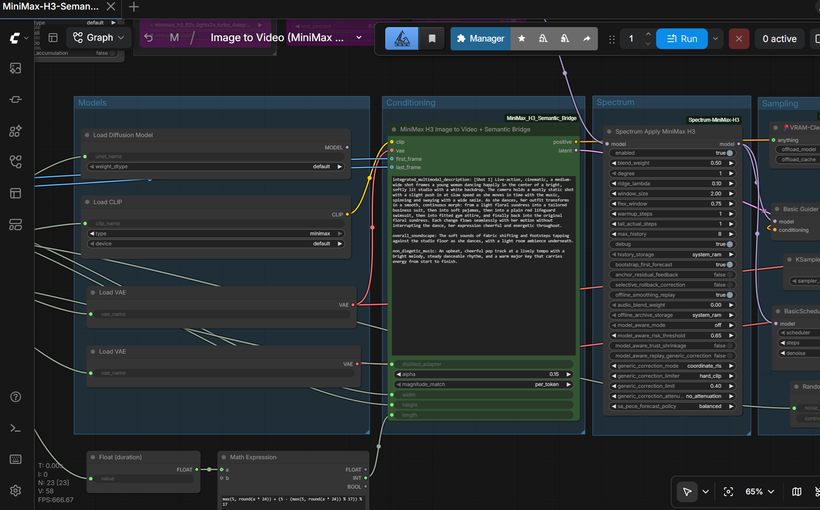
Requirements
- NVIDIA RTX 30XX / 40XX / 50XX GPU
- CUDA-compatible GPU (~24 GB VRAM comfortable; the adapter itself is tiny and adds almost nothing)
- At least 30 GB free storage
Model downloads
- speach1sdef178 https://huggingface.co/speach1sdef178/MiniMax-H3-Semantic-Bridge
- MiniMaxH3_SemanticBridge_v1.safetensors https://huggingface.co/speach1sdef178/MiniMax-H3-Semantic-Bridge/tree/main
- Comfy-Org/MiniMax-H3 https://huggingface.co/Comfy-Org/MiniMax-H3
- minimax_h3_fl2va_pruned_int8_convrot.safetensors https://huggingface.co/Comfy-Org/MiniMax-H3/tree/main/diffusion_models
- qwen3vl_32b_minimax_h3_nvfp4_awq.safetensors https://huggingface.co/Comfy-Org/MiniMax-H3/tree/main/text_encoders
- minimax_h3_audio_vae_fp32.safetensors https://huggingface.co/Comfy-Org/MiniMax-H3/tree/main/vae
Custom nodes
- ComfyUI Manager https://github.com/ltdrdata/ComfyUI-Manager
- ComfyUI-KJNodes https://github.com/kijai/ComfyUI-KJNodes
- rgthree-comfy https://github.com/rgthree/rgthree-comfy
- ComfyUI Nvidia RTX Nodes https://github.com/Comfy-Org/Nvidia_RTX_Nodes_ComfyUI
Setup steps
- Installing the Custom Node (Read This — It's Different)
- Download MiniMax_H3_Semantic_Bridge_v1.0.zip from the repo.
- Extract it into your ComfyUI/custom_nodes/ folder.
- Restart ComfyUI.
- Want the One-Click Setup?
- Patreon (one-click installer) - https://www.patreon.com/TheLocalLab/posts/minimax-h3-all-167996909
- Individual purchase (locallabdigest) - https://www.locallabdigest.com/product-page/minimax-h3-all-in-one-comfyui-one-click-windows-installer
Notes & tips
- Honest Expectations: The improvement is qualitative, not guaranteed. The author presents it as evidence from controlled A/B comparisons, not a statistical claim that it universally improves adherence. It helped in their tests; how much it helps you will depend on your prompt.; Use the standard (fl2va) model if you have it. The Semantic Bridge was distilled from H3's standard text-conditioning path, so it's built for the fl2va diffusion model, and that's what I'd recommend using it with. It will still run on the ref2va model — I used it with ref2va for text-to-video without issue — but the author found the Ref2VA path gave worse results in reference-audio/singing tests (weaker vocal articulation, mumbling lip motion). So if you have both, prefer fl2va, especially for anything involving audio-driven lip movement.
- Other Custom Nodes: ComfyUI Manager - https://github.com/ltdrdata/ComfyUI-Manager; ComfyUI-KJNodes - https://github.com/kijai/ComfyUI-KJNodes; rgthree-comfy - https://github.com/rgthree/rgthree-comfy; ComfyUI Nvidia RTX Nodes - https://github.com/Comfy-Org/Nvidia_RTX_Nodes_ComfyUI
- Install the node ZIP first (above), then load the workflow and confirm all models are selected — the fl2va base model, the text encoder, both VAEs, and the Semantic Bridge adapter in the node's distilled_adapter slot.
- Turbo toggle: the Lora toggle in the Fast Groups Bypasser turns the lightx2v turbo LoRA on or off. It ships disabled (standard path) by default — flip it on for faster 4-8 step generation with the turbo LoRA.
- Write your prompt in H3's structured format (the more specific, the more the Semantic Bridge has to work with).
- Use the Resolution Selector; H3's native canvas is a 768px short edge, multiple of 32.
- The node exposes an alpha / blend strength — start with the workflow's default and adjust if you want a stronger or gentler push toward the prompt.
- Match your duration to the length you want; it snaps to H3's 17-frame grid at 24fps.
More resources
- Patreon (one-click installer) https://www.patreon.com/TheLocalLab/posts/minimax-h3-all-167996909
- Individual purchase (locallabdigest) https://www.locallabdigest.com/product-page/minimax-h3-all-in-one-comfyui-one-click-windows-installer
- https://get.runpod.io/Minimax-H3-ComfyUI
Want the 1-click version?
Skip the manual model downloads and node installs — get a ready-to-run installer, or unlock all 80+ with Local Lab Pro.