MiniMax H3 Fused Turbo (4-Step)
A new fused build of MiniMax H3 that bakes everything into a single model — the base H3, the distilled turbo LoRA, and a motion-smoothing style LoRA all fused together. Because it's fused, there are no LoRA loader nodes to wire up: you load one diffusion model and generate. It runs at 4 steps, so it's noticeably faster than the standard 8-step setup, and the quality holds up impressively well for a distilled model.
✓ 100% free — download the workflow and run it locally.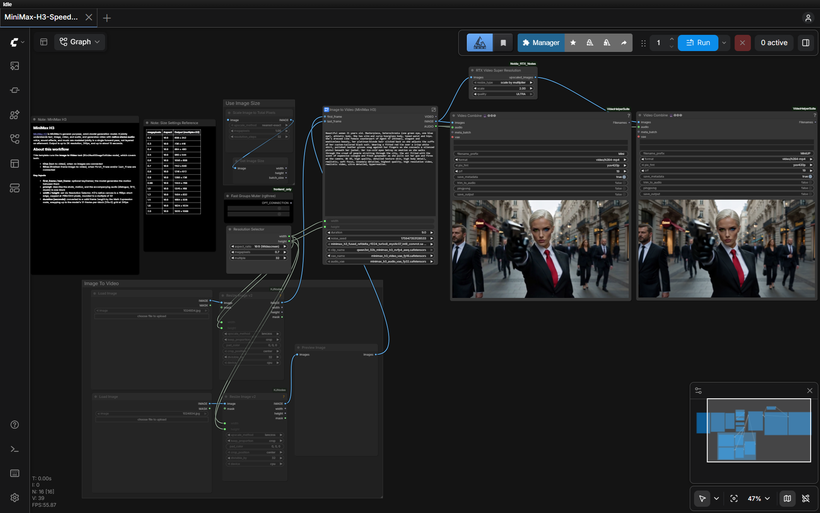
Requirements
- NVIDIA RTX 30XX / 40XX / 50XX GPU
- CUDA-compatible GPU (12 - 16 GB VRAM minimum, ~24 GB VRAM comfortable; lower can work with the memory-management nodes)
- At least 30 GB free storage
Model downloads
- MATLOWAI https://huggingface.co/MATLOWAI/minimax-h3-fused-turbo-int8-convrot
- minimax_h3_fused_refdelta_r1024_turbo8_mystic07_int8_convrot.safetensors – the fused model https://huggingface.co/MATLOWAI/minimax-h3-fused-turbo-int8-convrot/tree/main/diffusion_models
- qwen3vl_32b_minimax_h3_nvfp4_awq.safetensors https://huggingface.co/Comfy-Org/MiniMax-H3/tree/main/text_encoders
- minimax_h3_audio_vae_fp32.safetensors https://huggingface.co/Comfy-Org/MiniMax-H3/tree/main/vae
Custom nodes
- ComfyUI Manager https://github.com/ltdrdata/ComfyUI-Manager
- ComfyUI-KJNodes https://github.com/kijai/ComfyUI-KJNodes
- rgthree-comfy https://github.com/rgthree/rgthree-comfy
- ComfyUI Nvidia RTX Nodes (RTX Video Super Resolution) https://github.com/Comfy-Org/Nvidia_RTX_Nodes_ComfyUI
Setup steps
- Want the One-Click Setup?
- Patreon (one-click installer) - https://www.patreon.com/TheLocalLab/posts/minimax-h3-all-167996909
- Individual purchase (locallabdigest) - https://www.locallabdigest.com/product-page/minimax-h3-all-in-one-comfyui-one-click-windows-installer
Notes & tips
- Why This One Is Worth Trying: No LoRA nodes. Everything's baked into one model — no separate turbo LoRA to load, no extra wiring. Simplest H3 workflow I've put together.; 4-step generation. Half the steps of standard H3, so faster generations depending on your hardware.; Native audio, still. Voice, SFX, and music generated jointly with the video, same as the rest of the H3 line.; Strong quality for a distilled model. The motion-smoothing fusion helps it hold up well at the lower step count.
- Load the workflow and confirm the four models are selected — the fused model in the loader, the text encoder, and both VAEs.
- Settings: steps 4, cfg 1.0, sampler euler, scheduler simple. No LoRA strength to set since there's no LoRA node.
- For text-to-video, leave the first/last frame inputs empty. For image-to-video, connect a first frame, last frame, or both.
- Write your prompt as one block covering the shot, motion, and audio (dialogue, SFX, music) — H3 generates them together.
- Use the Resolution Selector rather than typing raw dimensions — H3's native canvas is a 768px short edge, rounded to a multiple of 32.
- Match your duration to the length you want; it snaps to H3's 17-frame grid at 24fps.
- Start short to confirm your prompt and settings before committing to a longer render.
More resources
- Patreon (one-click installer) https://www.patreon.com/TheLocalLab/posts/minimax-h3-all-167996909
- Individual purchase (locallabdigest) https://www.locallabdigest.com/product-page/minimax-h3-all-in-one-comfyui-one-click-windows-installer
- https://get.runpod.io/Minimax-H3-ComfyUI
Want the 1-click version?
Skip the manual model downloads and node installs — get a ready-to-run installer, or unlock all 80+ with Local Lab Pro.