LTX 2.3 Director v2 (12 GB GGUF)
LTX 2.3 Director v2 turns ComfyUI into a timeline video editor. Instead of maintaining separate workflows for text-to-video, image-to-video, image+audio and multi-keyframe sequences, you build everything on one track — drop in images, layer a prompt over each segment, add your own audio, and extend or trim clips without rewiring the graph. Version 2 adds IC-LoRA support for structural control, VFX and restoration passes. This build uses GGUF quantised models so the whole thing fits inside 12 GB of VRAM.
✓ 100% free — download the workflow and run it locally.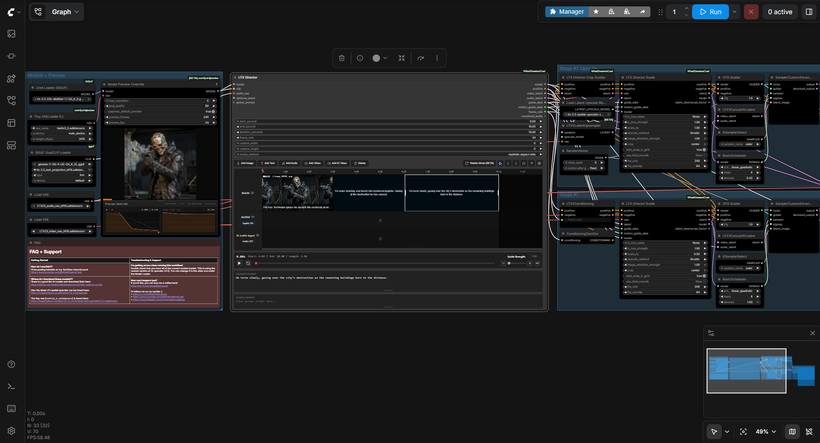
Requirements
- GPU: NVIDIA RTX 30XX/40XX/50XX
- VRAM: 12 GB minimum
- OS: Windows 10 or 11
- Storage: 40 GB+ free
Model downloads
- ltx-2.3-22b-distilled-1.1 (Q3_K_S GGUF) — models/unet/ https://huggingface.co/unsloth/LTX-2.3-GGUF/tree/main/distilled-1.1
- gemma-3-12b-it (UD-Q4_K_XL GGUF) — models/clip/ https://huggingface.co/unsloth/gemma-3-12b-it-GGUF/tree/main
- ltx-2.3 text projection (bf16) — models/clip/ https://huggingface.co/Kijai/LTX2.3_comfy/tree/main/text_encoders
- LTX23 video VAE (bf16) — models/vae/ https://huggingface.co/Kijai/LTX2.3_comfy/tree/main/vae
- LTX23 audio VAE (bf16) — models/vae/ https://huggingface.co/Kijai/LTX2.3_comfy/tree/main/vae
- taeltx2_3 tiny VAE — models/vae/ https://huggingface.co/Kijai/LTX2.3_comfy/tree/main/vae
- ltx-2.3-spatial-upscaler-x2-1.1 — models/latent_upscale_models/ https://huggingface.co/Lightricks/LTX-2.3/tree/main
- Optional: LTX-2.3 22B full checkpoints (BF16/FP8) https://huggingface.co/Kijai/LTX2.3_comfy/tree/main/diffusion_models
Custom nodes
- ComfyUI Manager https://github.com/ltdrdata/ComfyUI-Manager
- WhatDreamsCost-ComfyUI (the Director node) https://github.com/WhatDreamsCost/WhatDreamsCost-ComfyUI
Setup steps
- Install ComfyUI Manager and its requirements, then place every model in the folder listed above.
- Create models/latent_upscale_models/ if it doesn't already exist — the spatial upscaler goes there.
- Load the workflow below into ComfyUI and use Install missing custom nodes for anything that fails to load.
- Build your shot on the timeline first: images go on the main track, a prompt attaches to each segment, and the global prompt applies across the whole thing.
- Verify the loaders point at the GGUF unet, the GGUF text encoder and both VAEs, then run.
Notes & tips
- Director 2 needs current versions of ComfyUI-LTXVideo and ComfyUI-KJNodes. If you update the Director node later, update those two as well or it will fail to load — this is the most common reason people can't get it running.
- A segment prompt overrides the global prompt for that stretch of the timeline.
- For IC-LoRA work, drag your reference video onto the IC-LoRA track rather than wiring a separate conditioning chain. It stays compatible with prompt relay, keyframes and custom audio.
- The workflow runs a two-stage pass — base generation then spatial upscale. Bypass Stage 2 while you're dialling in a prompt, then re-enable it for the final render.
- Timeline duration is the main driver of VRAM and generation time. Get the composition right at a few seconds before extending it.
- Black frames on an audio segment usually mean your audio doesn't span that part of the timeline — gaps are handled differently from silence.
More resources
- LTX Director node by WhatDreamsCost (GitHub) https://github.com/WhatDreamsCost/WhatDreamsCost-ComfyUI
- WhatDreamsCost tutorial — how to use LTX Director https://www.youtube.com/watch?v=vM60pJJqqEI
- Kijai's LTX-2.3 22B diffusion models https://huggingface.co/Kijai/LTX2.3_comfy/tree/main/diffusion_models
Want the 1-click version?
Skip the manual model downloads and node installs — get a ready-to-run installer, or unlock all 80+ with Local Lab Pro.