HeartMuLa Song Generator
HeartMuLa is an open source, Apache 2.0 licensed AI music model that generates full songs with actual sung lyrics from a text prompt — the closest thing yet to running Suno on your own machine. It pairs an autoregressive music language model with HeartCodec, an ultra low frame rate 12.5 Hz codec, to produce studio quality tracks with vocals in multiple languages from a style description plus your own lyrics. It supports fine-grained section control, so you can describe intro, verse and chorus separately in plain language. This workflow runs the generator with lyric input, style tags and a built-in transcribe path, built around merged single-file versions of the models.
✓ 100% free — download the workflow and run it locally.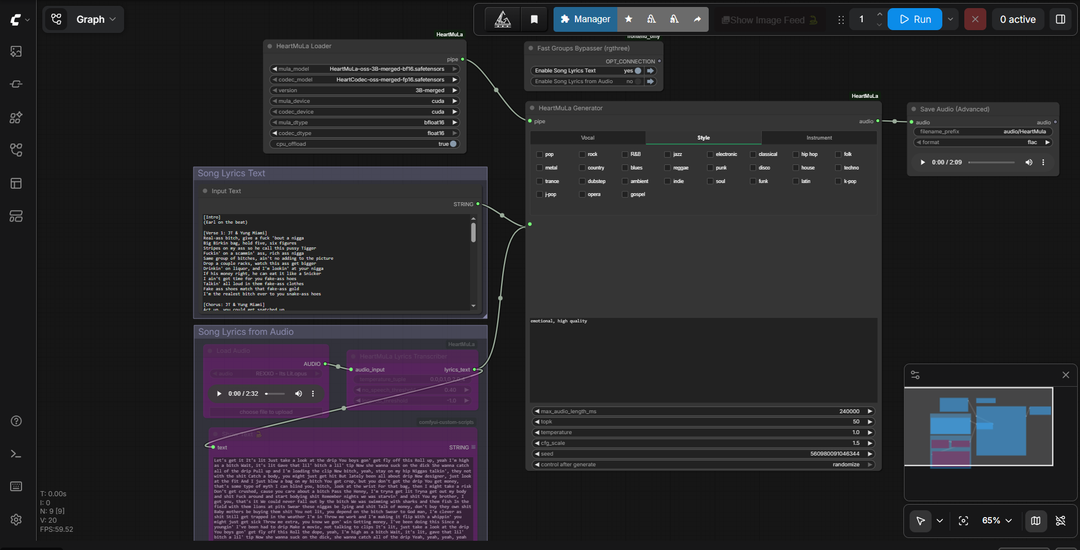
Requirements
- GPU: NVIDIA RTX 30XX/40XX/50XX
- VRAM: 12 GB minimum
- OS: Windows 10 or 11
- Storage: 40 GB+ free
Model downloads
- HeartMuLa-oss-3B-merged-bf16.safetensors — models/checkpoints/ https://huggingface.co/Thelocallab/HeartMuLa-oss-ComfyUI/tree/main
- HeartCodec-oss-merged-fp16.safetensors — models/checkpoints/ https://huggingface.co/Thelocallab/HeartMuLa-oss-ComfyUI/tree/main
- HeartTranscriptor-oss (full folder) — models/HeartMuLa/HeartTranscriptor-oss/ https://huggingface.co/HeartMuLa/HeartTranscriptor-oss/tree/main
Custom nodes
- ComfyUI Manager https://github.com/ltdrdata/ComfyUI-Manager
- ComfyUI-HeartMuLa (generator, BF16 support) — install manually https://github.com/crazyma99/ComfyUI-HeartMuLa
- HeartMuLa_ComfyUI (transcriptor node) https://github.com/benjiyaya/HeartMuLa_ComfyUI
- rgthree-comfy https://github.com/rgthree/rgthree-comfy
- ComfyUI Custom Scripts https://github.com/pythongosssss/ComfyUI-Custom-Scripts
Setup steps
- Install ComfyUI Manager and its requirements.
- Clone crazyma99's ComfyUI-HeartMuLa into ComfyUI/custom_nodes manually — it is not in the ComfyUI Manager registry, so Install missing custom nodes will not find it.
- Download the three models into the folders listed above. HeartTranscriptor is a folder of config and tokenizer files plus the weight, not a single file — keep the structure intact or the transcribe node won't find it.
- Load the workflow below into ComfyUI.
- Check the HeartMuLaLoader points at the merged BF16 generator and the FP16 HeartCodec, with model type set to 3B-merged.
- Write your lyrics with section tags, put your style tags in the separate prompt, and run.
Notes & tips
- You need both node packs. crazyma99's provides the generator with BF16 support, benjiyaya's provides the transcriptor — neither alone covers the full workflow.
- Mark your sections with tags rather than pasting one undivided block of text. Structure is what turns raw vocals into a song.
- Keep style tags separate from lyrics. Genre, mood, instrumentation and vocal style go in the tags prompt; the lyrics box is only what gets sung.
- Use the Fast Groups Bypasser to switch between generation and the transcribe path without rebuilding the graph.
- Keep your first generations short — a verse and a chorus is enough to check your prompt before committing to a full track.
- Generation is autoregressive, so longer songs take proportionally longer and use more memory. If you run out of VRAM, shorten the target length first.
- The transcribe path pulls lyrics out of a reference audio file using HeartTranscriptor — that's what the Load Audio node feeds, not the generator.
More resources
- The Local Lab merged HeartMuLa models (Hugging Face) https://huggingface.co/Thelocallab/HeartMuLa-oss-ComfyUI/tree/main
- HeartTranscriptor-oss (Hugging Face) https://huggingface.co/HeartMuLa/HeartTranscriptor-oss/tree/main
Want the 1-click version?
Skip the manual model downloads and node installs — get a ready-to-run installer, or unlock all 80+ with Local Lab Pro.